I haven’t made many blog posts this year, due to working on a project at work that I just got open sourced. The project is called Gigi and it is a rapid prototyping and development platform for real time rendering, and GPU programming. We’ve used it to prototype techniques and collaborate with game teams, we’ve used it in published research (FAST noise), and used it to generate code we’ve shared out into the world.
More info on Gigi is here: https://github.com/electronicarts/gigi/
I also used Gigi to do the experiments and make the code that go with this blog post. Both the Gigi source files and the C++ DX12 code generated from those Gigi files are on github at https://github.com/Atrix256/BNOctaves.
Motivation
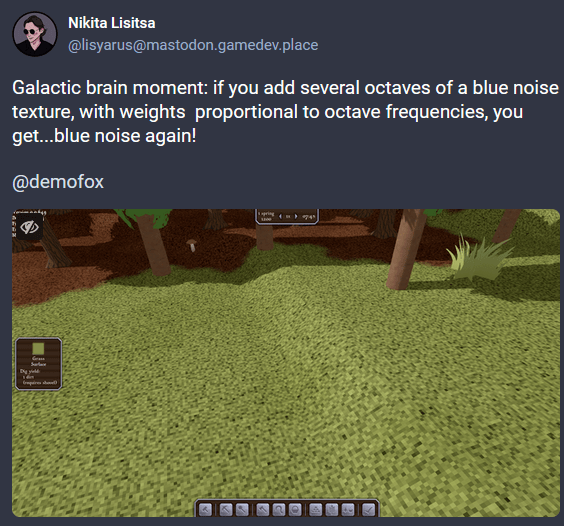
Link: https://mastodon.gamedev.place/@lisyarus/113057251773324600
Nikita tagged me in this interesting post with a neat looking screenshot. I thought this was interesting and wanted to look deeper so got the details.
The idea is that you start with a blue noise texture. You then add in another blue noise texture, but 2x bigger and multiplied by 1/2. You then add in another blue noise texture again, but 4x bigger, and multiplied by 1/4. Repeat this as many times as desired. While doing this process you sum up the weights (1 + 1/2 + 1/4 + …) and you divide the result by the weight to normalize it.
Results – Blue Noise
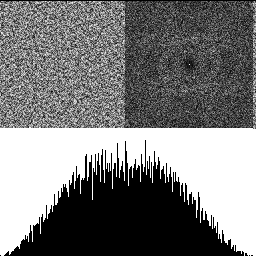
Here is a blue noise texture by itself, made using the FAST command line utility (https://github.com/electronicarts/fastnoise). The upper left is the noise texture. The upper right is the DFT to show frequency content, and the bottom half is a histogram. Here we can see that the texture is uniform blue noise. The histogram shows the uniform distribution, and the DFT shows that the noise is blue, because there is a dark circle in the center, showing that the noise has attenuated low frequencies.
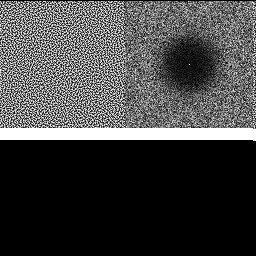
With 2 octaves shown below, there are lower frequencies present, and the histogram gets a hump in the middle. The low frequencies increase because when we double the size of the texture, it lowers the frequency content. The reason the histogram is no longer uniform is because of the central limit theorem. Adding random numbers together makes them follow a binomial distribution, and Gaussian at the limit (more info: https://blog.demofox.org/2019/07/30/dice-distributions-noise-colors/).
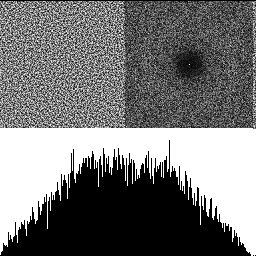
With 3 octaves shown below, the effects are even more pronounced.
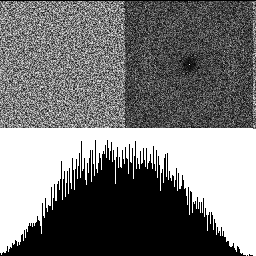
So yeah, adding octaves of blue noise together does produce blue noise! It makes the distribution more Gaussian though, and reduces the frequency cutoff of the blue noise.
Note: It doesn’t seem to matter much if I use the same blue noise texture for each octave, or different ones. You can control this in the demo using the “DifferentNoisePerOctave” checkbox.
Results – Other Noise Types
After going through the work of making this thing, I wanted to see what happened using different noise types too.
White Noise
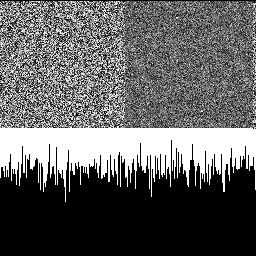
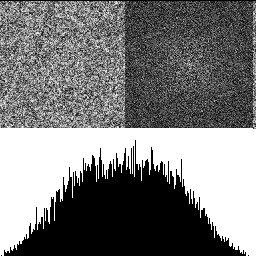
Here is 1 octave of white noise, then 3 octaves. White noise starts with randomized but roughly equal levels of noise in each frequency. This process looks to make the low frequencies more pronounced, which makes sense since the octaves get bigger and so are lower frequency.
3×3 Binomial Noise
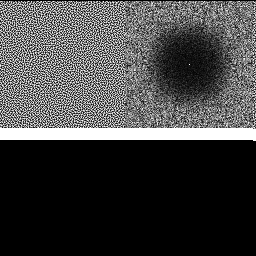
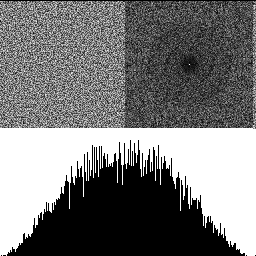
This noise type is something we found to rival “traditional” (gaussian) blue noise while writing the FAST paper. Some intuition here is that while blue noise has a frequency cutoff equal distance from the center (0hz aka DC), this binomial noise frequency cutoff has roughly equal distance from the edges (aka nyquist). More info on FAST here https://www.ea.com/seed/news/spatio-temporal-sampling.
Below is 1 octave, then 3 octaves. It seems to tell the same story, but the 3 octaves seem to have some concentric rings in the DFT which is interesting.
3×3 Box Noise
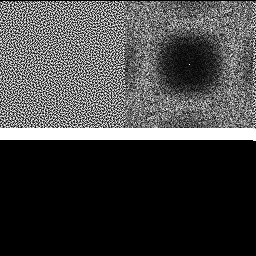
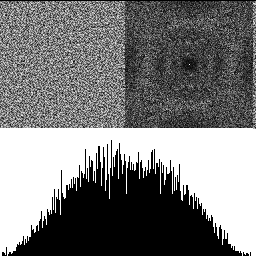
Here is noise optimized to be filtered away using a 3×3 box filter. 1 octave, then 3 octaves.
5×5 Box Noise
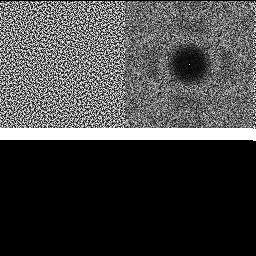
Here is noise optimized to be filtered away using a 5×5 box filter. 1 octave, then 3 octaves.
Results – Low Discrepancy Noise Types
Here are some types of low discrepancy noise.
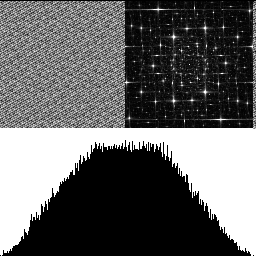
Interleaved Gradient Noise
Interleaved gradient noise is a low discrepancy object that doesn’t really have a name in formal literature. I call it a low discrepancy grid, which means we can use it as a per pixel source of random numbers, but it has low discrepancy properties spatially. It was invented by Jorge Jimenez at Activision and you can read more about it at https://blog.demofox.org/2022/01/01/interleaved-gradient-noise-a-different-kind-of-low-discrepancy-sequence/.
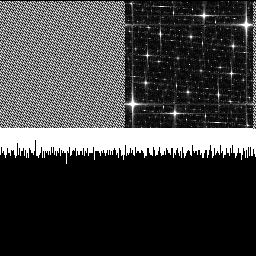
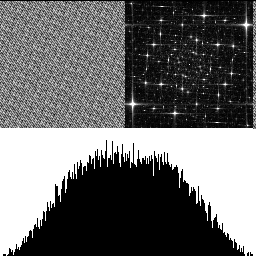
Here is 1 octave then 3 octaves. The DFT goes from a starfield to a more dense starfield.
R2 Noise
R2 is a low discrepancy sampling sequence based on the golden ratio (https://extremelearning.com.au/unreasonable-effectiveness-of-quasirandom-sequences/), but you can also turn it into a “low discrepancy grid”. You do so like this:
// R2 Low discrepancy grid
// A generalization of the golden ratio to 2D
// From https://extremelearning.com.au/unreasonable-effectiveness-of-quasirandom-sequences/
float R2LDG(uint2 pos)
{
	static const float g  = 1.32471795724474602596f;
	static const float a1 = 1 / g;
	static const float a2 = 1 / (g * g);
	return frac(float(pos.x) * a1 + float(pos.y) * a2);
}
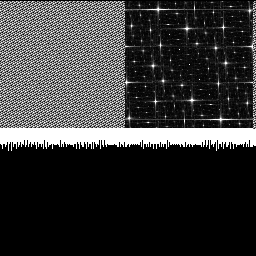
1 octave, then 3 octaves. The DFT goes from a starfield, to a swirly galaxy. That is pretty cool honestly! The histogram also have a lot less variance than other noise types, which is a cool property.
Wait… Isn’t This Backwards?
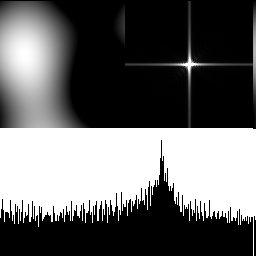
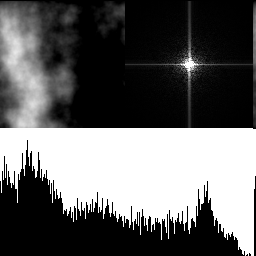
When we make Perlin noise, we start with the chunky noise first at full weight, then we add finer detail noise at less weight, like the below with 1 and 8 octaves of perlin noise.
In our noise experiments so far, we’ve been doing it backwards – starting with the smallest detailed noise at full weight, then adding in chunkier noise as lower weight. What if we did it the other way? The demo has a “BlueReverse” noise type that lets you look at this with blue noise. Here is 1, 3 and 5 octaves:
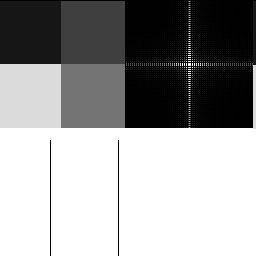
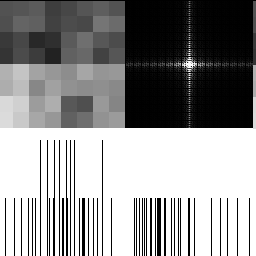
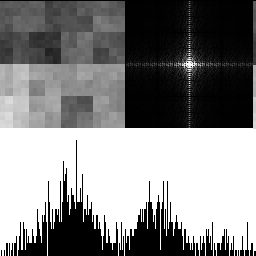
It has an interesting look, but does not result in blue noise!
Use of Gigi – The Editor
I used Gigi to make the demo and do the experiments for this blog post. You can run the demo in the Gigi viewer, or you can run the C++ dx12 code that Gigi generated from the technique I authored.
I want to walk you through how Gigi was used.
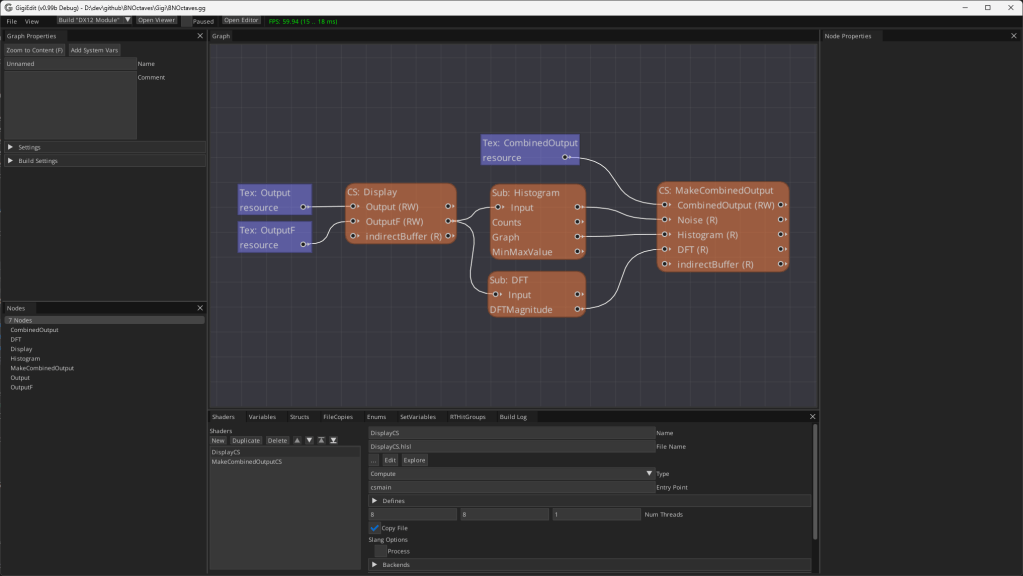
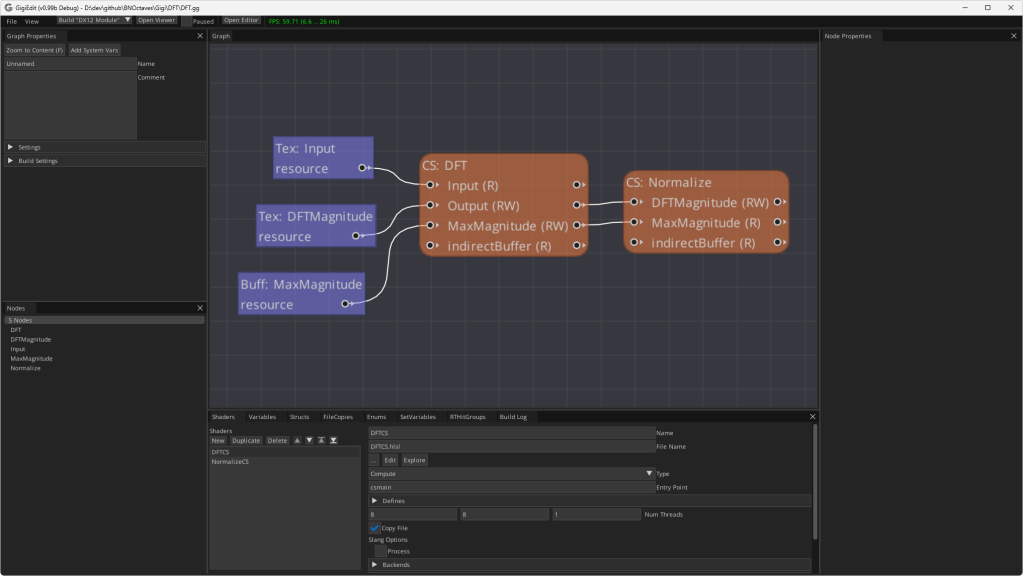
Below is the technique in the Gigi editor. The “CS: Display” node makes the noise texture with the desired number of octaves. “Sub: Histogram” makes the histogram graph. “Sub: DFT” makes the DFT. “CS: MakeCombinedOutput” puts the 3 things together into the final images I pasted into this blog post.
If you double click the “Sub: Histogram” subgraph node, it shows you the process for making a histogram for whatever input texture you give it. This is a modular technique that you could grab and use in any of your Gigi projects, like it was used here!
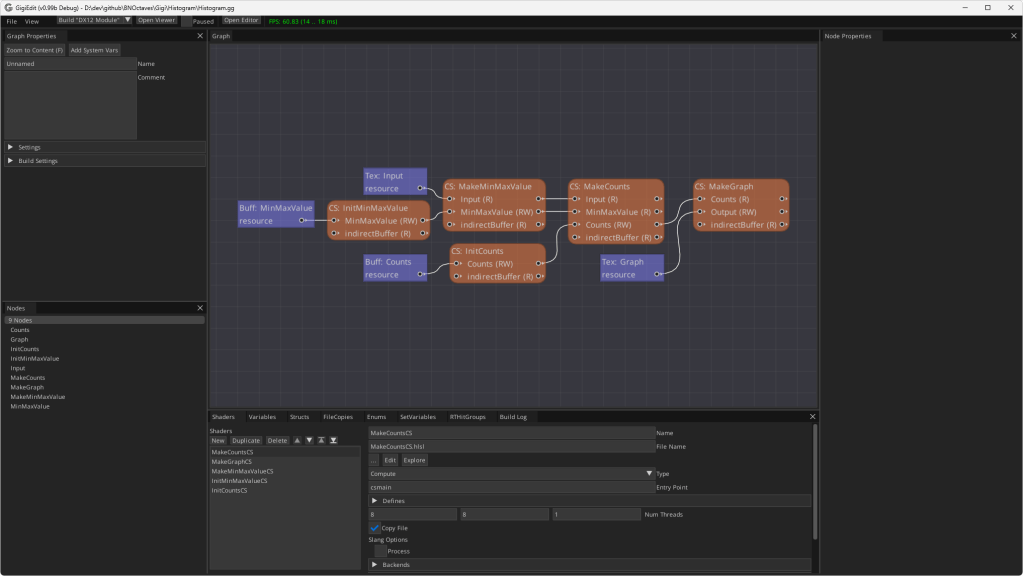
If you double click the “Sub: DFT” subgraph node instead, you would see this, which is also a modular, re-usable technique if ever you want to see the frequency magnitudes of an image. Note: This DFT is not an FFT, it’s a naive calculation so is quite slow.
Use of Gigi – The Viewer
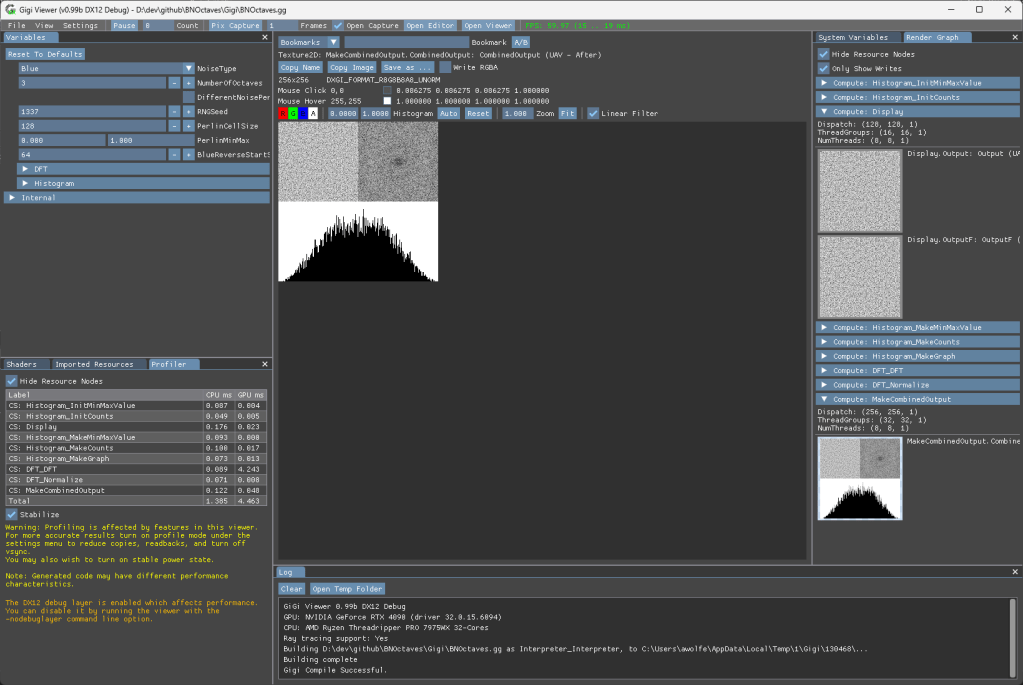
If you click “Open Viewer” in the main technique (BNOctaves.gg) it will open it in the viewer. You can change the settings in the upper left “Variables” tab and see the results instantly. You can also look at the graph at different points in the execution on the right in the “Render Graph” tab, and can inspect the values of pixels etc like you would with a render doc capture. A profiler also shows CPU and GPU time in the lower left. (I told you the DFT was slow, ha!). For each image above in this blog post, i set the parameters like I wanted and then clicked “copy image” to get it to paste into this blog post.
Use of Gigi – The Compiler & Generated Code
I used GigiCompiler.exe to generate “DX12_Application” code for this technique and the results of that are in the “dx12” folder in the repo. You run “MakeSolution.bat” to have cmake create BNOctaves.sln and then can open and run it. Running that, you have the same parameters as you do in the viewer, including a built in profiler.
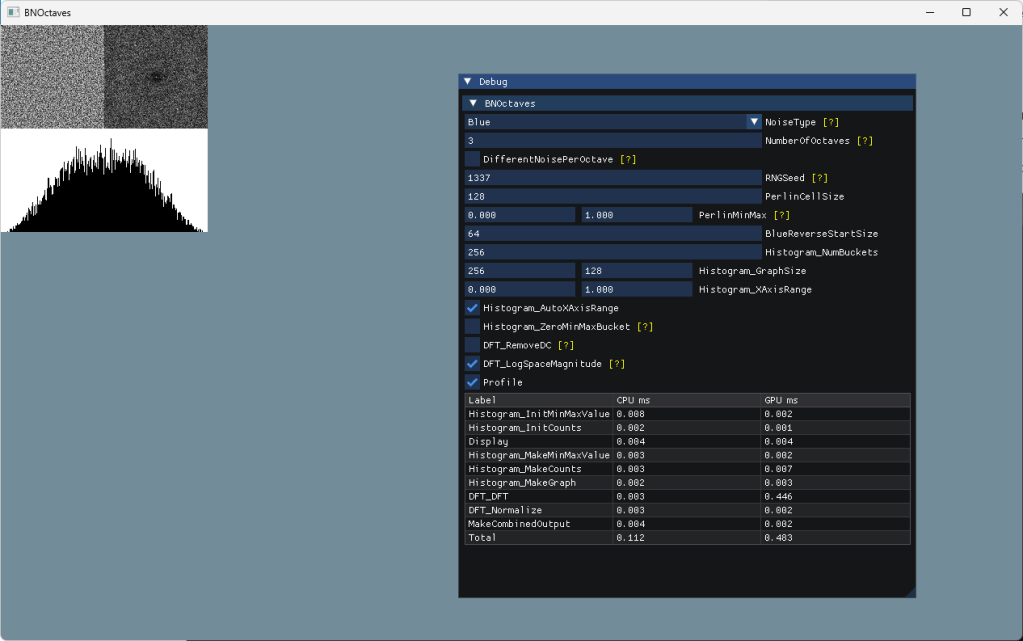
I did have to make one modification after generating the C++ DX12 code. There are “TODO:”s in the main.cpp to help guide you, but in my case, all I needed to do was copy the “Combined Output” texture to the render target. That is on line 456:
            // TODO: Do post execution work here, such as copying an output texture to g_mainRenderTargetResource[backBufferIdx]
            CopyTextureToTexture(g_pd3dCommandList, m_BNOctaves->m_output.texture_CombinedOutput, m_BNOctaves->m_output.c_texture_CombinedOutput_endingState, g_mainRenderTargetResource[backBufferIdx], D3D12_RESOURCE_STATE_RENDER_TARGET);
Closing
I sincerely believe that “the age of noise” in graphics has just begun. I more mean noise meant for use in sampling or optimized for filtering, but that type of noise may have use in procedural content generation too, like this post explored.
I am also glad that Gigi is finally open sourced, and that I can use this absolute power tool of research in blog posts like this, while also helping other people understand the value it brings. Hopefully you caught a glimpse of that in this post.
 The blog at the bottom of the sea
With “Blue Reverse” you seem to be building a Daubeches D2 wavelet.
LikeLike
It annoys me you write that Interleaved gradient noise was invented by Jorge Jimenez, when I invented it 3 years before he did.
LikeLike
CeeJayDK? Ive seen you on shadertoy.
What’s the story there? How similar was it? Have any links showing it or anything?
LikeLike
I created SweetFX in 2011 and started working on an idea to dither my output to solve the banding issues that could occur if someone pushed the contrast and color changes too far or used the vignette effect.
I was looking for the fastest way to make a usable dithering pattern (GPUs were much slower back then) and the injector I was using did not allow me to make and sample custom textures so it had to be done with math in the code (we’ve since made a new injector called Reshade that has no such limitations).
The first version with my dither was SweetFX 1.1 released Sep 2nd 2012 – https://www.nexusmods.com/skyrim/mods/23364?tab=files
It did a simple checkerboard pattern.
Something like frac(dot(tex, screen_size * 0.5) + 0.25); //returns 0.25 and 0.75
This compiles to a DP2ADD followed by a FRC
This evolved into several variations on the standard algorithm when I found that using more complex fractions allowed for more complex patterns with more levels and thus more intermediate shades for the dither. More virtual bits essentially.
And so what I see as my algorithm is frac(dot(coordinates, MAGIC_NUMBERS)
It produces cross hatching patterns, and whenever I see those patterns in a dither it always turns out to be this algorithm or a mathematical equivalent.
The extra magic number add at to the end is optional – I originally used +0.25 because not all pixels for the checkerboard would land perfectly on 0.0 or 0.5 due to precision errors and so shifting away from 0.0 ensured that an error wouldn’t make it go to ~0.999..
I no longer use the checkerboard pattern for dithering but it is useful for logic branching in code if you need it.
I also recognized that doing different patterns for each color component would create more levels of brightness than shifting all 3 components in the same way.
This can be done by calculating more patterns if needed, but since I went for the best speed I choose to simply shift green in the opposite direction of red and blue, because green is the color our eyes is most sensitive to and so this component shift was the easiest way to create brightness change closer to 50% of a single 8bit brightness step.
During 2013 I then made my pattern more complex by experimenting with many other magic numbers.
Just before releasing a new SweetFX version with this more complex dither pattern with better magic numbers I discovered A Dither by Øyvind Kolås http://pippin.gimp.org/a_dither/
I contacted him and also ported his dither to hlsl. When I did and simplified the math it turned that his addition dither was the same basic formula as mine frac(dot(coordinates, MAGIC_NUMBERS) just with different magic numbers, so we had independently invented the same dither, just for two different architectures (his was for CPU and it’s used in Gimp). That said he had also made a XOR version which I couldn’t use because I needed compatibility with DirectX 9. No big deal because the addition version had the better quality.
So Øyvind Kolås was probably the second person to invent this.
Around this time I believe Valve also made a dither which when simplified looks very similar to my algorithm – I can’t find the reference right now but I believe I may have seen it in a developer blog about their Half-life 2 HDR lighthouse demo.
And then in 2014 Jimenez made his version, which he scrambles further with another multiply and a frac. I don’t feel this is necessary as long as you pick good magic numbers to begin with but it’s a option if you want to break up the original cross hatching pattern with more crossing hatches.
He also used it for a rotating grid, and coined the name Interleaved Gradient Noise (which is now the name it’s most well known as).
He was first for these additions but he was the 4th to invent the underlying algorithm.
It’s been reinvented / discovered many times since.
I also later helped my friend Pascal Gilcher (Marty from Martysmods – I believe you also know him from Shadertoy or from his RTGI work) to simplify and optimize a new dithering algorithm he had invented.
Once we had found the most optimal expression it turned out to be my frac(dot(coordinates, MAGIC_NUMBERS) again just with different magic numbers 🙂
The last people I saw to invent IGN was ID software/Bethesda who wrote about how they used it (for Doom Eternal I believe)
I think the reason it gets rediscovered by so many is a combination of it’s simplicity and that there are so many magic number combinations that work well so finding a good one isn’t hard.
Also blue noise still reigns as the best for dither quality, so to compete with that you have to be either faster or better, and since we probably can’t do better (that’s a matter of finding a better generator of blue noise) then we need to be faster than a texture lookup.
And that search for something faster than a texture lookup usually ends at this algorithm.
To find equally fast alternatives I think we need to try bitwise operations like Øyvind Kolås did, or similar tricks like asfloat asint or asuint to scramble our pattern.
It’s akin to finding a PRNG – some of the same tricks work.
I’d be happy to talk more about dithering ideas – DM me on discord if you’re interested.
LikeLike
That’s interesting history.
To me, the issue is that literature, the academic world, and the professional world, are missing the concept of a “low discrepancy grid”, and these are all different manifestations of that thing. In sampling there is such a thing as a “rank 1 lattice” which is this formulation being used to make points instead of per pixel values. You have a value you multiply the index by to get the x axis component of the point, another to get the y axis, and so on to however high dimensionality you want.
Different values used for the axes result in different properties, and a particularly good one in 2D is the “R2” sequence from Martin Roberts we’ve all seen around: https://extremelearning.com.au/unreasonable-effectiveness-of-quasirandom-sequences/
You can turn that R2 sequence into a “low discrepancy” grid too by multiplying a pixel x coordinate by the g1 magic number, the y coordinate by the g2 magic number, and adding them together.
I think these things are waiting for someone to realize the importance and study them more deeply, but it seems like they are only really useful for realtime rendering, so it’s just game devs and demo sceners that seem to realize the value haha.
The thing I really like about IGN is that it’s meant to have roughly all the values 0/9, 1/9, … 8/9 in every 3×3 block of pixels, even overlapping ones. That makes it well suited for making better renders under TAA’s neighborhood clamping.
But like you point out, there are other considerations to think about, and different types of noise can take advantage of those other properties.
I think these things should be categorized, studied, and showcased more, so people understand the importance, and the diversity of what’s available and keep pushing this type of work forward that you and the others have pioneered.
LikeLike