Easy Binomial Expansion & Bezier Curve Formulas

In this post we are going to explore two things:

  1. Learn how to easily be able to expand (x+y)^N for ANY value N using the binomial theorem (well, N has to be a positive integer…)
  2. Use that for coming up with the equation for a Bezier curve of any degree (any number of control points)

Binomial Theorem

The binomial theorem is a way of easily expanding (x+y)^N. As you probably know, if N is 2, you can use FOIL (first, outer, inner, last). If N gets above 2, things start to get harrier though and more tedious.

Let’s check out how the values look when N is 1, 2 and 3:

N (x+y)^N Expanded
1 x+y
2 x^2+2xy+y^2
3 x^3+3x^2y+3xy^2+y^3

To help make the patterns more visible, let’s make things a bit more explicit:

N (x+y)^N Expanded
1 1x^1y^0+1x^0y^1
2 1x^2y^0+2x^1y^1+1x^0y^2
3 1x^3y^0+3x^2y^1+3x^1y^2+1x^0y^3

The easiest pattern to see is that there are N+1 terms.

The next pattern that might jump out at you looking at the above table, is that in the first term, y starts out at power 0, and the next term has a power of 1, and the power of y keeps increasing by 1 for each term left to right until we run out of terms. Similarly, x starts out at a power of 0 on the last term, has a power of 1 on the second last term, and counts up going from right to left, until we run out of terms.

Those patterns explain how many terms there are and the powers of x and y for each term. There is one piece left of the puzzle though, which is those constants that each term is multiplied by.

Those constants are called the “binomial coefficients” and they also appear as rows on pascal’s triangle. In short, each number in pascal’s triangle is a sum of the numbers directly above it. Below is an image to show what I’m talking about. Check the links section at the end for more detailed info.

So if you notice, the 2nd row of pascal’s triangle is “1,1”. Those are the constants multiplied by each term for the N=1 case. The next row down is “1,2,1” which is the constants multiplied by each term for the N=2 case. Lastly the next row down (fourth row) is “1,3,3,1” which is the constants multiplied by each term for the N=3 case. Essentially, you just use the N+1th tow of pascals triangle to come up with the constants to multiply each term by.

There are algorithms for calculating the N+1th row of the pascal’s triangle. I have one such algorithm in the example code below, but also check the links section for more info on that.

TADA! That is the binomial theorem.

Bezier Curve Equation Generalized (Again)

You may remember that I previously showed you a generalized way to get the equation for a bezier curve of any order in Bezier Curves Part 2 (and Bezier Surfaces).

It wasn’t too difficult, but it DID require you to manually expand (x+y)^N. Now that we know how to do that more easily, thanks to the section above, let’s revise how we come up with bezier curves of any order.

What you do is evaluate P=(s+t)^N, and then multiply each term by a unique control point (A,B,C,etc). After you have your equation, you can optionally replace all s‘s with (1-t), or you can just remember that when you evaluate the equation, since the first form is less messy.

Boom, you are done, that’s all!

Here’s the quadratic (N=2) version to see the end result:
P = As^2 + 2Bst + Ct^2

Formalized Mathematical Description

The above makes a lot of sense and is easy to understand, wouldn’t it be neat if math could describe it that way?

Well… it turns out it can, and does. Here is the formal “explicit definition” of bezier curves:
\sum\limits_{i=0}^n\binom {n} {i}(1-t)^{n-i}t^iP_i

If you remember from above, s is the same as (1-t) so you could also write it like this:
\sum\limits_{i=0}^n\binom {n} {i}s^{n-i}t^iP_i

The \sum\limits_{i=0}^n (Sigma, going from 0 to n) means that you are going to sum (add) together n+1 terms (it includes both 0 and n), using i as the loop variable in your summation. It’s basically a for loop, adding together each iteration of the for loop. Everything that comes after is what happens during each iteration of the for loop that gets summed together.

The \binom {n} {i} part means to take the ith number from the (n+1)th row of Pascal’s triangle. More formally, this specifies to use specific binomial coefficients.

The next part s^{n-i}t^i means that you multiply the binomial coefficient by s to the (n-i)th power, and t to the ith power. This is the same as saying s starts at power n and counts down left to right, while t starts at 0 and counts up left to right. This fits the pattern we saw above in binomial expansion.

Lastly comes P_i which means to use the ith P. So, P is basically an array with n+1 elements. This array is the control points, so each P is a different control point.

So, to sum it all up, it’s saying to make a for loop from 0 to n where you are going to add up the results of each for loop. For each loop iteration, where i is the index variation of the loop, you are going to:

  1. Start with the ith item from the (n+1)th row of pascals triangle
  2. Multiply that by s^(n-i)t^i
  3. Multiply that by a unique control point

There ya go, formalized math descriptions with crazy symbols can actually mean something useful. Who would have thought?!

Here is the quadratic bezier curve again for you to look at (quadratic means n = 2), in a form that will help you when thinking about the steps above:
P = 1s^2t^0A + 2s^1t^1B + 1s^0t^2C

And when it’s cleaned up, it looks more familiar:
P = As^2 + 2Bst + Ct^2

Example Code

#include <stdio.h>
#include <vector>

//=====================================================================================
void WaitForEnter ()
{
    printf("nPress Enter to quit");
    fflush(stdin);
    getchar();
}

//=====================================================================================
std::vector<unsigned int> PascalsTriangleRow(int row)
{
	std::vector<unsigned int> ret;
	ret.push_back(1);
    for (int i = 0; i < row; ++i)
        ret.push_back(ret[i] * (row - i) / (i + 1));
	return ret;
}

//=====================================================================================
void main(void)
{
	printf("Expand (x+y)^N and give Bezier curve order NnnPlease enter N:n");
	unsigned int N;
	// keeping it limited to a sane value. also protects against -1 being huge.
	// Also, so we don't run out of letters for control points!
	if (scanf("%u",&N)==1 && N < 26)
	{
		auto row = PascalsTriangleRow(N);

		// binomial expansion
		printf("nBinomial Expansion:n");
		if (N == 0)
		{
			printf("1");
		}
		else
		{
			for (unsigned int i = 0, c = row.size(); i < c; ++i)
			{
				if (i > 0)
					printf(" + ");

				if (row[i] != 1)
					printf("%u", row[i]);

				unsigned int xPow = N - i;
				if (xPow > 0)
				{
					printf("x");
					if (xPow > 1)
						printf("^%i", xPow);
				}

				unsigned int yPow = i;
				if (yPow > 0)
				{
					printf("y");
					if (yPow > 1)
						printf("^%i", yPow);
				}
			}
		}

		// bezier curves
		printf("nnBezier Curve Order %u:nP = ", N);
		if (N == 0)
		{
			printf("A");
		}
		else
		{
			for (unsigned int i = 0, c = row.size(); i < c; ++i)
			{
				if (i > 0)
					printf(" + ");

				// control point name
				printf("%c*",'A'+i);

				if (row[i] != 1)
					printf("%u", row[i]);

				unsigned int sPow = N - i;
				if (sPow > 0)
				{
					printf("s");
					if (sPow > 1)
						printf("^%i", sPow);
				}

				unsigned int tPow = i;
				if (tPow > 0)
				{
					printf("t");
					if (tPow > 1)
						printf("^%i", tPow);
				}
			}
		}

		// bezier curves
		printf("nnOr:nP = ", N);
		if (N == 0)
		{
			printf("A");
		}
		else
		{
			for (unsigned int i = 0, c = row.size(); i < c; ++i)
			{
				if (i > 0)
					printf(" + ");

				// control point name
				printf("%c*",'A'+i);

				if (row[i] != 1)
					printf("%u", row[i]);

				unsigned int sPow = N - i;
				if (sPow > 0)
				{
					printf("(1-t)");
					if (sPow > 1)
						printf("^%i", sPow);
				}

				unsigned int tPow = i;
				if (tPow > 0)
				{
					printf("t");
					if (tPow > 1)
						printf("^%i", tPow);
				}
			}
		}

		printf("n");
	}
	else
	{
		printf("Invalid value for Nn");
	}
	WaitForEnter();
}

Example Output

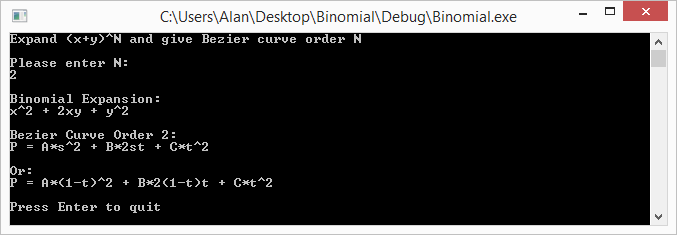
Here are some runs of the program


Links

Note that even though we talked about binomials, and bezier curves, these techniques can be expanded to trinomials and bezier triangles – and beyond! (hint: there is such thing as Pascal’s pyramid!)

Here are some links to more info about some of the topics talked about above:
Wikipedia: Binomial Theorem
Wikipedia: Pascal’s Triangle
Wikipedia: Binomial Coefficient
StackOverflow: How to efficiently calculate a row in pascal’s triangle?

No Bad Code, Creeping Normality and Social Structure Code Organization

In the last post I said that another post was coming regarding using bilinear texture sampling for something interesting. Hopefully without sounding too pretentious, that interesting thing I wanted to write up has shown quite a bit of fruit, so I’m going to try to write it up and see about getting it put into The Journal of Computer Graphics Techniques. We’ll see how that pans out, and I’ll make sure and share once it’s published (or if I can’t get it published hehe) as well as a post on the process of trying to get something published, in case other people out there are interested in pursuing that sort of thing.

Today’s post is a bit different than usual. There are some interesting concepts that I’ve been exposed to that I think are worth sharing, and that I’m hoping you will also find interesting.

No Bad Code

One idea presented to me recently was the concept that there is no bad code. The idea being that people make decisions in code based on the situations at the time, and that as situations change, code that once was totally reasonable, and most engineers would likely have made the same choices, no longer is seen as a good choice in the new sets of circumstances.

I’m going to be a bit cynical here and mention that I do believe there is bad code, and that it comes around due to bugs, as well as lack of knowledge, lack of experience, and lack of testing before deployment. However, the idea of code that is now seen as bad, was once perfectly reasonable does make sense to me and is kind of interesting.

I know we’ve all hit code that we or others wrote that we despise, causes us grief, and gets in the way of us working what we ought to be working on. This concept definitely does absolve SOME such code I’ve personally had to deal with. But, there is definitely plenty of code left that it doesn’t. In my personal examples, this mostly comes from shoddy third party middleware software, and also, just a lack of knowledge or experience on the part of the implementer. I’m guilty of the second point, but I think we all are, and that is a sign we are learning and growing.

It’s probably good to keep in mind that lousy code of the present may have been perfectly reasonable code of the past, and before deciding that code was lousy, or that a specific engineer is terrible, that you have to judge the code in the light that it was put in.

… Then refactor it.

Creeping Normality

Creeping normality is an interesting concept. Basically, just like that old tale of a frog sitting in progressively hotter water til it boils (which by the way is debunked by snopes), it’s easy for individuals or companies to find themselves in situations that would NEVER be seen as ideal situations, but were arrived at by incremental mis-steps – or also just a changing landscape.

This relates to the last point a bit, because it can show how the needs of a piece of code can change over time, such that looking at it as a static snapshot in time, you might wonder why it’s so complex and trying to do so many different things needlessly.

This can also happen to a company on a more global scale, and can explain some really odd, less than ideal behaviors a company might be doing, where you are pretty sure the people involved know better.

How do you fight creeping normality? Good question… but when you are able to identify some oddness or problems that come up due to it, hopefully it’s as early as possible, and hopefully the people with the power to make things right listen to you (:

Social Structure Code Organization

The last topic is kind of bizarre, but totally makes sense once you think about it. The idea is that code will match the communication structure of the teams making the code.

This is Conway’s law which says: “organizations which design systems … are constrained to produce designs which are copies of the communication structures of these organizations”. Another good quote from the wikipedia page for Conway’s law states that (paraphrased) “if you have four teams working on a compiler, you’ll end up with a four pass compiler”.

This can be seen a lot in situations where you have a game engineering team and an engine engineering team. There will be a distinct line between the code bases, based on the responsibility of the teams. If instead, you have some code where the engine and game team are the same, there will be no such line, and if you then try to split that team into being a game and engine team, it’ll take some time to draw the line between responsibilities, separate the code along those lines, and possibly do something like get the code into separate projects and possibly code repositories, which all seems like a logical choice to do when you have separate teams.

I think this also relates back to the first point about “No Bad Code”, because were someone to come into a team where the organization had recently changed, they are going to wonder why the code doesn’t have nice abstracted API layers at the boundaries, like most folks would consider logical and good practice. Perhaps too, this would be a case of creeping normality, or at least, if the project organization changed, it could be the result of a reaction AGAINST creeping normality.

In short, there are a lot of ways in which perfectly good code can go bad, and it’s probably a good idea to think about that a bit before condemning code as inherently rotten.

HOWEVER, rotten code does exist. I’d name some names, but it would probably be classified as slander, so i’ll bite my tongue. I’m sure you have plenty of examples of your own (;

Lastly, if you are responsible for crimes against code-manity in days past, either due to any of the reasons above, or because you didn’t know things you know now, or even if you were just lazy or misguidedly purposefully malicious (?!), remember this: You are not your mistakes!

OK, enough of that, next post will be on some cool programming technique, I promise 😛

Bilinear Filtering & Bilinear Interpolation

Take a look at the picture below. Can you calculate the values at points A,B and C?

There’s a technique for doing this called bilinear interpolation which extends the idea of linear interpolation into two dimensions.

To calculate bilinear interpolation, you just do linear interpolation on one axis, and then the other.

Check out these examples:

Point A
Point A has a coordinate of (0.2,0.8). Let’s start with the X axis.

Firstly, we’ll do interpolation across the top of the square on the X axis. That means we need to go 0.2 (20%) of the way from 7 to 0. That 0.2 is our x axis coordinate. To calculate that we do this:
7 + (0-7) * 0.2 = 5.6

Next, we’ll do interpolation across the bottom of the square on the X axis. So similar to above, we’ll go 0.2 (20%) of the way from 3 to 5. To calculate that we do this:
3 + (5-3) * 0.2 = 3.4

Now that we have interpolated across our X axis we need to interpolate across our Y axis. We are now going to go 0.8 (80%) of the way from our bottom value (the value of Y = 0), to our top value (the value of Y = 1). The bottom value is the bottom interpolation we did (3.4) and the top value is the top interpolation we did (5.6).

So, we need to go 0.8 (80%) of the way from 3.4 to 5.6. To calculate that we do this:
3.4 + (5.6 – 3.4) * 0.8 = 5.16

So, the value at point A is 5.16. The image below should help explain visually the process we went through.

Point B

Point B has a coordinates of (1.0,0.5).

Let’s start with the X axis interpolation again (although you could easily start with Y first if you wanted to! You’d end up with the same result).

Doing the X axis interpolation across the top, we need to go 1.0 (100%) of the way from 7 to 0. I’m sure you can guess what the answer is but here it is calculated:
7 + (0-7) * 1.0 = 0

Similarly, let’s do the X axis interpolation across the bottom. We need to go 1.0 (100%) of the way from 3 to 5.
3 + (5-3) * 1.0 = 5

Next up comes the Y axis interpolation. We need to go 0.5 (50%) of the way from 5 to 0.
5 + (0-5) * 0.5 = 2.5

There we go, the value at point B is 2.5. That should make sense too by looking at the diagram. It’s basically 1d linear interpolation between 5 and 0, and is half way between them, so intuitively, the answer 2.5 should make sense.

Point C

Point C has a coordinate of (0.8,0.2).

Once again, let’s do the X axis interpolation across the top of the box. We need to go 0.8 (80%) of the way from 7 to 0.
7 + (0-7) * 0.8 = 1.4

Then, we need to do the x axis interpolation across the bottom of the box. We need to go 0.8 (80%) of the way from 3 to 5.
3 + (5-3) * 0.8 = 4.6

Lastly, the y axis interpolation. We need to go 0.2 (20%) from 4.6 to 1.4.
4.6 + (1.4-4.6) * 0.2 = 3.96

The value of point C is 3.96

Bilinear Filtering

While bilinear interpolation is useful if you have a grid of data that you want to interpolate values within (such as a height field that represents terrain?!), where this really shines in game development is in bilinear texture filtering.

Basically, when you have a texture coordinate that doesn’t perfectly line up with the center of a pixel in the texture (because there’s a remainder), it uses the fractional part of the coordinate within that pixel to do bilinear interpolation between the 4 pixels involved to come up with the final pixel color. It does bilinear interpolation on each of the channels: Red, Green, Blue and Alpha.

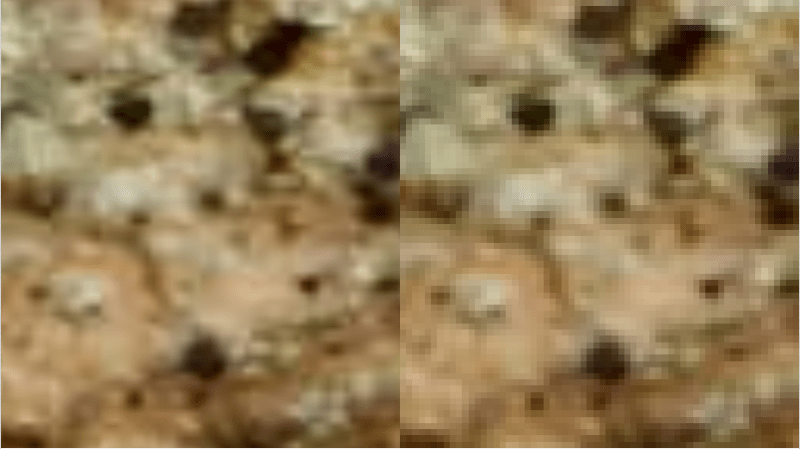
The end result is pretty good! Check out the image below to see it in action on a texture that we are zoomed in too far on. The left side uses bilinear filtering, while the right side does not, and just shows you the nearest pixel.

Consequently, bilinear texture filtering has to do 4 pixel reads to be able to interpolate between them, instead of a single pixel read like when doing nearest pixel sampling. More pixel reads = more overhead, and not as cheap (computationally) to use.

Links

For some folks who are reading this, this info is pretty basic and you might be wondering why i bothered writing about it. Look to the next post for something kind of bizarre regarding bilinear filtering. This was needed as a stepping stone to the next thing I want to show you guys 😛

Wikipedia: Linear Interpolation

Wikipedia: Bilinear Interpolation

Wikipedia: Bilinear Filtering

The Dark Side of Bilinear Filtering

Check out these links for some deeper info about some shortcomings (and some workarounds) of hardware based bilinear sampling:
iq: hardware interpolation
iq: improved texture interpolation

FlipQuad & FlipTri Antialiasing

Here are the last two SSAA algorithms/sampling patterns that I wanted to share – FlipQuad and FlipTri.

FlipQuad

The last post talked about 4-Rook antialiasing which took 4 samples per pixel to do antialiasing.

Before that we talked about quincunx which was able to get 5 samples per pixel, while only rendering 2 samples per pixel. It was able to do that by sharing “corner samples” among 4 pixels.

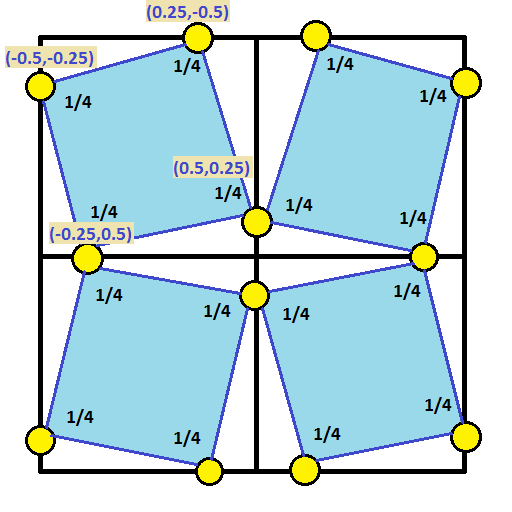
If you combine the ideas from the last two posts, you could start with the 4-rook sampling points and push them to the edge of the pixel so that the edge samples can be shared between the pixels that share the edge.

If you do that though, you’ll actually have two samples on each edge. To solve this and keep the same number of sample points per pixel, you could flip every other pixel’s sample points.

Ta-Da! That is exactly what FlipQuad is. Check out the sampling pattern below, which shows the samples for a 2×2 grid of pixels. You’d just repeat this pattern for as many pixels as you had.

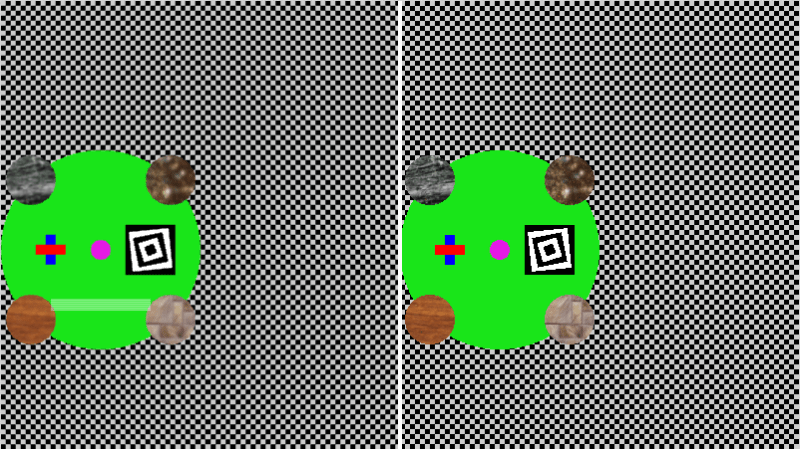
Here’s an image that shows FlipQuad in action – anti aliased on the left, regular image on the right. You can click on the image to see the shadertoy demo of it.

It works pretty well, but it is pretty blurry, especially the textures! Kind of makes sense because quincunx was blurry due to shared samples. We have ONLY shared samples in this pattern, so it’s understandable that it’s kind of blurry. There’s less unique information per pixel than in the other SSAA techniques shown so far.

This essentially is 2 samples rendered per pixel to get 4x SSAA.

ShaderToy: FlipQuad AntiAliasing

FlipTri

Flipquad worked decently, but instead of using a quad, could we use a triangle? Yes we can, check out the 2×2 pixel sampling pattern below:

Here’s an image that shows FlipTri in action – anti aliased on the left, regular image on the right. You can click on the image to see the shadertoy demo of it.

This essentially is 1.25 samples rendered per pixel to get 3x SSAA! It really doesn’t look that different to my eyes than the flipquad method, but it uses quite a fewer number of samples!

ShaderToy: FlipTri AntiAliasing

Conclusion

So basically, there’s a bunch of different ways to do SSAA style anti aliasing, even beyond the ones I showed, but in the end you are basically just taking more samples and/or sharing samples across multiple pixels to get a better resulting image.

SSAA is also a common technique in raytracing, where they will shoot multiple rays per pixel, and combine them together in this way, sometimes for things like movies, they will cast hundreds of rays per pixel! You could also just render multiple times and do one of the methods we’ve talked about in the last couple post instead of explicitly shooting multiple rays per pixel.

At SIGGRAPH 2014, someone mentioned in the “advancements in realtime rendering” talk that they used the flipquad pattern along with temporal supersampling. That made it so the 2 samples rendered per pixel was amortized across two frames and thus became one sample per pixel, which is pretty nifty. I feel like you could extend that to flip tri’s and perhaps render less than 1 sample per pixel each frame.

A big issue with implementing these in modern graphics situations is that it’s difficult to render a sample once and share it across multiple pixels. I have a way in mind involving rendering the scene a couple times with different sized buffers and offsets, but not sure yet if it’s practical. Temporal supersampling algorithms definitely seem like they could benefit from these exotic patterns more easily.

Up next I think I’m going to try and figure out MSAA, which has similar results as SSAA, but from the sound of things, performs a bit better.

Links

FlipQuad Research Paper: FLIPQUAD: Low-Cost Multisampling
Rasterization

FlipTri Research Paper: An Extremely Inexpensive
Multisampling Scheme

A Weighted Error Metric and Optimization Method for
Antialiasing Patterns

CGT 511
(Anti)aliasing

Bart Wronski: Temporal supersampling and antialiasing

A Family of Inexpensive Sampling Schemes

4-Rook Antialiasing (RGSS)

The last post was about quincunx antialiasing which used 5 samples per pixel, but allowed you to share 4 of those samples with 4 other pixels each, making it so you only had to render 2 samples per pixel to get those 5 samples per pixel.

I also mentioned that shadertoy didn’t allow you to render to texture so in my shadertoy demo, i had to actually just do 5 samples per pixel to be able to show you the quincunx effect.

If you ever find yourself in that sort of a situation where you can’t (or don’t want) to render your scene twice, 4-Rook Antialiasing may be more what you are looking for.

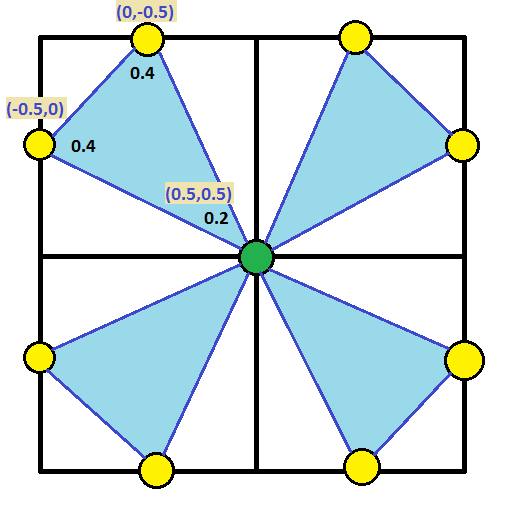
4-Rook anti aliasing takes 4 samples per pixel, and does so in the pattern below with the specified blend weights. This pattern is also sometimes called rotated grid supersampling (RGSS) and is also a subset of “N-Rook” supersampling where your sample points within a pixel don’t share a vertical or horizontal line with any other sample point. The N-Rook sample patterns are good at breaking up horizontal or vertical aliasing.

Interestingly, 4-Rook AA looks less blurry than quincunx so is higher quality. Intuitively, I’d have to say that makes sense, especially since it is more expensive to do (you render 4 samples per pixel instead of 2!), and also, while quincunx technically has 5 samples per pixel, and 4-Rook only has 4, those 4 samples are all NEW information used only once, while 4 of the samples in quincunx are “old news” and just the old information repeated again.

I think of it like this… the difference between a blur and real SSAA is that in a blur, you try to improve the image with no added information, while in SSAA you try to improve the image WITH added information. Quincunx is on the spectrum between those two since it re-uses 4 samples (minimal “new information”), while 4-rook’s samples are all new information.

Note that you could implement this anti aliasing by rendering your scene 4 times, each time offset by one of the 4 offsets. You would then do a final full screen pass to average each pixel across all 4 renders. In other words: Output[x][y] = (A[X][Y] + B[X][Y] + C[X][Y] + D[X][Y])/4.

Click the image below to be taken to the shadertoy demo of 4-rook anti aliasing.

Here is the quincunx image again for reference, note how it looks blurier in comparison to the 4-Rook image above (check out the red/blue rectangles to see that best), and that the spiral squares don’t quite look as good (they look more aliased?) and that the background grid is ever so slightly darker than the 4-rook version above (or the aliased version of the grid in either picture)!

Shadertoy: 4-Rook Antialiasing (RGSS)

Quincunx Antialiasing

If you are looking for a quick and easy antialiasing implementation, quincunx could be what you are looking for.

Quincunx is part of the family of anti aliasing called supersampling antialiasing (SSAA), which all work by taking multiple samples per pixel, each sample being offset by some amount, and then adding the samples back together with various weightings to get the final antialiased pixel color.

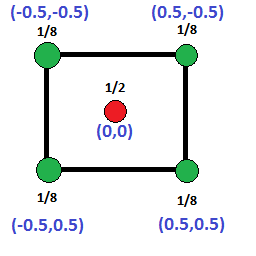
Quincunx antialiasing works by mixing five samples per pixel, in the pattern of the diagram below with the specified weights. The real interesting and useful thing about it though is that the 4 corner samples are each re-used by 4 other pixels, which makes it so that even though you take five samples per pixel, you are in effect really only rendering TWO samples per pixel to get results similar to 5x supersampling antialiasing!

Basically, the performance cost is about the same as 2x SSAA, but gives you results similar to 4x-5x SSAA.

Trivial Note: The word quincunx describes the position of those 5 dots, which is the same configuration you see for the number five on a six sided die.

Since the corners are a half pixel offset from the center pixel, the algorithm for doing quincunx sampling is as follows:

  1. Render your scene to a full size buffer (same size as your output render target), offsetting your camera in screen space by (0.5,0.5) pixels
  2. Next, render your scene to the usual render target as normal
  3. Run a full screen pixel shader post effect on your normal “output render target”. For each pixel:
    1. Multiply the pixel color channels by 0.5
    2. Add in these four offsets from the current pixel location, in the “offset” buffer (the first one rendered), multiplying the color channels by 0.125: (-1,-1), (-1,0), (0,-1), (0,0).

That’s all there is to it! Click the image below to be taken to an animated shadertoy I made which does quincunx antialiasing in a WebGL pixel shader. Shadertoy unfortunately doesn’t let you render to texture, so i have to do all 5 samples per pixel, but you can see see the effect compared to no anti aliasing at all, and the results are pretty nice!

The left half of the image is quincunx antialiased while the right side is not antialiased at all.

A few more creative supersampling AA algorithms coming next (:

Shadertoy: Quincunx Anti Aliasing

Frequency Domain Audio Synthesis – With IFFT and Oscillators

One way to look at sounds is to think about what frequencies they contain, at which strengths (amplitudes), and how those amplitudes change over time.

For instance, if you remember the details of the post about how to synthesis a drum sound (DIY Synth: Basic Drum), a drum has low frequencies, but also, the frequencies involved get lower over the duration, which gives it that distinctive sound.

Being able to analyze the frequency components of a sound you want to mimic, and then being able to generate audio samples based on a description of frequency components over time is a powerful tool in audio synthesis.

This post will talk about exactly that, using both oscillators as well as the inverse fast Fourier transform (IFFT).

We’ve already gone over the basics of using oscillators to create sounds in a previous post so we’ll start with IFFT. For a refresher on those basics of additive synthesis check out this link: DIY Synth 3: Sampling, Mixing, and Band Limited Wave Forms

All sample sound files were generated with the sample code at the end of this post. The sample code is a single, standalone c++ file which only includes standard headers and doesn’t rely on any libraries. You should be able to compile it and start using the techniques from this post right away!

What is the IFFT?

Audio samples are considered samples in the “time domain”. If you instead describe sound based on what frequencies they contain, what amplitudes they are at, and what phase (angle offset) the sinusoid wave starts at, what you have is samples in the “frequency domain”.

The process for converting time domain to frequency domain is called the “Fourier Transform”. If you want to go the opposite way, and convert frequency domain into time domain, you use the “Inverse Fourier Transform”.

These transforms come in two flavors: continuous and discrete.

The continuous Fourier transform and continuous inverse Fourier transform work with continuous functions. That is, they will transform a function from time domain to frequency domain, or from frequency domain to time domain.

The discrete version of the fourier transform – often refered to as DFT, short for “discrete fourier transform” – and inverse fourier transform work with data samples instead of functions.

Naively computing the DFT or IDFT is a very processor intensive operation. Luckily for us, there is an algorithm called “Fast Fourier Transform” or FFT that can do it a lot faster, if you are ok with the constraints of the data it gives you. It also has an inverse, IFFT.

IFFT is what we are going to be focusing on in this post, to convert frequency domain samples into time domain samples. Also, like i said above, we are also going to be using oscillators to achieve the same result!

Using the IFFT

Here’s something interesting… where time domain samples are made up of “real numbers” (like 0.5 or -0.9 or even 1.5 etc), frequency domain samples are made up of complex numbers, which are made up of a real number and an imaginary number. An example of a complex number is “3.1 + 2i” where i is the square root of negative 1.

If you look at the complex number as a 2d vector, the magnitude of the vector is the amplitude of the frequency, and the angle of the vector is the phase (angle) that the sinusoid (cosine wave) starts at for that frequency component.

You can use these formulas to create the complex number values:

real = amplitude * cos(phase);
imaginary = amplitude * sin(phase);

Or you could use std::polar if you want to (:

BTW thinking of complex numbers as 2d vectors might be a little weird but there’s precedent. Check this out: Using Imaginary Numbers To Rotate 2D Vectors

When using the IFFT, the number of frequency domain samples you decide to use is what decides the frequencies of those samples. After preforming the IFFT, you will also have the same number of time domain samples as frequency domain samples you started with. That might sound like it’s going to be complex, but don’t worry, it’s actually pretty simple!

Let’s say that you have 4 buckets of frequency domain data, that means you will end up with 4 time domain audio samples after running IFFT. Here are the frequencies that each frequency domain sample equates to:

  • index 0: 0hz. This is the data for the 0hz frequency, or DC… yes, as in DC current! DC represents a constant added to all samples in the time domain. If you put a value in only this bucket and run the IFFT, all samples will be the same constant value.
  • index 1: 1hz. If you put a value in only this bucket and run the IFFT, you’ll end up with one full cosine wave (0-360 degrees aka 0-2pi radians), across the 4 time domain samples. 4 samples isn’t very many samples for a cosine wave though so it will look pretty blocky, but those 4 samples will be correct!
  • index 2: 2hz. If you put a value in only this bucket and run the IFFT, you’ll end up with two full cosine waves (0-720 degrees aka 0-4pi radians) across the 4 time domain samples.
  • index 3: -1hz.

You might wonder what that negative frequency at index 3 is all about. A negative frequency probably seems weird, but it’s really the same as it’s positive frequency, just with a negative phase. It’s basically a cosine wave that decreases in angle as it goes, instead of increasing.

Why is it there though? Well, there’s something called the Nyquist–Shannon Sampling Theorem which states that if you have N time domain audio samples, the maximum frequency you can store in those audio samples is N/2 cycles. That frequency is called the Nyquist frequency and any frequency above that results in “aliasing”. If you’ve ever seen a car tire spin in reverse on tv when the care was moving forward, that is an example of the same aliasing I’m talking about. In manifests in audio as high pitches and in general terrible sounding sound. Before I knew how to avoid aliasing in audio, my now wife used to complain that my sounds hurt her ears. Once i removed the aliasing, she says it no longer hurts her ears. Go back and check the early DIY synth posts for audible examples of aliasing (;

Since we have 4 frequency domain samples, which translates to 4 time domain audio samples, we can only store up to 2hz, and anything above that will alias and seem to go backwards. That’s why index 3 is -1hz instead of 3hz.

So basically, if you have N frequency domain samples (or bins as they are sometimes called), the first bin, at index 0, is always 0hz / DC. Then from 1 up to N/2, the frequency of the bin is equal to it’s index. Then, at N/2+1 up to N-1, there are negative frequencies (frequencies beyond the Nyquist frequency) reflected in that upper half of the bins, starting at N/2 and counting back up to -1.

In many common situations (including the ones we are facing in this post), you don’t need to worry about the negative frequency bins. You can leave them as zero if doing IFFT work, or ignore their values if doing FFT then IFFT work.

Ready for one last piece of complexity? I hope so… it’s the last before moving onto the next step! 😛

Sounds are obviously much longer than 4 samples, so a 4 bin (sample) IFFT just isn’t going to cut it. 1000 bins would to be too few, and Frankly, at 44,100 samples per second (a common audio sampling rate), 88,200 bins is only 2 seconds of audio which isn’t very much at all! Even with the “Fast Fourier Transform” (FFT), that is a huge number of bins and would take a long time to calculate.

One way to deal with this would be to have fewer bins than audio samples that you want to end up with, use IFFT to generate the audio samples, and then use interpolation to get the audio samples between the ones generated by IFFT. We aren’t going to be doing that today but if you like the option, you can most certainly use it!

One of the ways we are going to deal with using a small number of bins to generate a lot of noise is that we are going to use the IFFT to generate wave forms, and then we are going to repeat those wave forms several times.

Another one of the things we are going to do is use IFFT bins to generate a small number of samples, and then modify the IFFT bins to generate the next number of samples, repeating until we have all of our audio samples generated.

In both cases, the frequency buckets need some conversion from the IFFT bin frequencies to the frequencies as they will actually appear in the final audio samples.

To calculate the true frequency of an FFT bin, you can use this formula:

frequency = binNumber * sampleRate / numBins;

Where binNumber is the IFFT bin number, sampleRate is how many samples the resulting sound has per second, and numBins is the total number of IFFT bins.

Simple Wave Forms

The simplest of the wave forms you can create is a cosine wave. You just put the complex number “1 + 0i” into one of the IFFT bins, that represents an amplitude of 1.0 and a starting phase of 0 degrees. After you do that and run ifft, you’ll get a nice looking cosine wave:
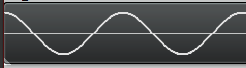
Note that the wave repeats multiple times. This is because I repeat the IFFT data over and over. If I didn’t repeat the IFFT data, the number of cycles that would appear would depend completely on which IFFT bin I used. If I used bin 1, it would have only one cycle. If i used bin 2, it would have two cycles.

Also note that since the IFFT deals with INTEGER frequencies only, that means that the wave forms begin and end at the same phase (angle) and thus the same amplitude, which means that if you repeat them end to end, there will be no discontinuities or popping. Pretty cool huh?

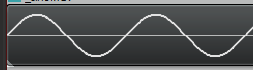
If you instead put in the complex number “0 – 1i” into one of the IFFT bins, that represents an amplitude of 1.0 and a starting phase of 270 degrees (or -90 degrees), which results in a sine wave:
We don’t have to stop there though. Once again thinking back to the info in DIY Synth 3: Sampling, Mixing, and Band Limited Wave Forms, the frequency components of a saw wave are described as:

If you have a saw wave of frequency 100, that means it contains a sine wave of frequency 100 (1 * fundamental frequency), another of frequency 200 (2 * fundamental frequency), another of 300 (3 * fundamental frequency) and so on into infinity.

The amplitude (volume) of each sine wave (harmonic) is 1 over the harmonic number. So in our example, the sine wave at frequency 100 has an amplitude of 1 (1/1). The sine wave at frequency 200 has an amplitude of 0.5 (1/2), the sine wave at frequency 300 has an amplitude of 0.333 (1/3) and so on into infinity.

After that you’ll need to multiply your sample by 2 / PI to get back to a normalized amplitude.

We can describe the same thing in IFFT frequency bins believe it or not!

Let’s say that we have 50 bins and that we want a 5hz saw wave. The first harmonic is 5hz and should be full amplitude, so we put an entry in bin 5 for amplitude 1.0 * 2/pi and phase -90 degrees (to make a sine wave instead of a cosine wave).

The next harmonic should be double the frequency, and 1/2 the amplitude, so in bin 10 (double the frequency of bin 5), we put an entry for amplitude 0.5 * 2/pi, phase -90 degrees. Next should be triple the original frequency at 1/3 the amplitude, so at bin 15 we put amplitude 0.33 * 2/pi, phase -90 degrees. Then, bin 20 gets amplitude 0.25 * 2/pi, -90 degrees phase. Bin 25 is the Nyquist frequency so we should stop here, and leave the actual Nyquist frequency empty.

If you run the IFFT on that, you’ll get a bandlimited saw wave!
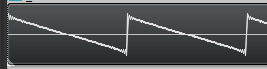
You can do the same for bandlimited triangle and square waves, and also you can use a random phase and amplitude for each bin to generate noise! The source code for this post generates those in fact (:

Phase Adjusted Wave Forms

While we are dealing in frequency space, I want to run something kind of gnarly by you. Using the technique described above, you can add frequencies with specific amplitudes to make a band limited saw wave. But, believe it or not, the starting phase of the frequencies don’t have to be -90 degrees. If you use a different phase, you’ll get a resulting wave form that looks different but sounds the same. Check these out, it’s a trip!
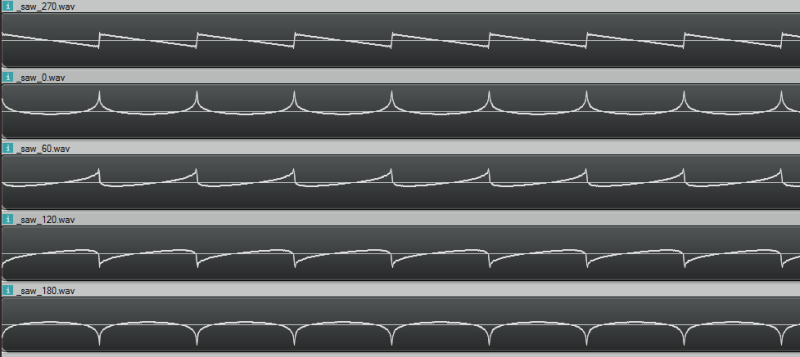
Here are the sound files pictured above, so you can hear that they really do all sound the same!
270 degrees
0 degrees
60 degrees
120 degrees
180 degrees

Bins Changing Over Time

If you are like me, when you think about designing sound in the frequency domain you think everything must be rainbows and glitter, and that you have no limitations and everything is wonderful.

Well, as happens so many times when the rubber hits the road, that isn’t quite true. Let’s go through an example of using IFFT on some bins that change over time so I can show you a really big limitation with IFFT.

In our example, let’s say that we have a single frequency in our IFFT data (so we are generating a single sinusoid wave) but that we want it’s amplitude (volume) to change over time. Let’s say we want the amplitude of the wave to be controlled by another sinusoid, so that it smoothly goes up and down in amplitude over time.

We immediately hit two problems, but the first is more obvious if you listen:

IFFTTest1.wav

Hear all that popping? It’s basically making a discontinuity at every IFFT window because we are changing the amplitude at the edge of each window. We can’t change it during the window (caveat: without some pretty advanced math i won’t go into), so changing at the end of the window is our only option. Check out this image to see the problem visually:

We can fix those discontinuities. If we change the phase of the wave from cosine (0 degrees) to sine (270 degrees), we make it so that the edge of the window is always at amplitude 0 (sine(0) = 0, while cos(0) = 1!). This means that when we change the amplitude of the wave, since it happens when the wave is at zero, there is no discontinuity, and so no more pops:

Let’s have a listen:
IFFTTest2.wav

WHAT?! There is still some periodic noise… it is tamed a little bit but not fixed. The reason for this is that even though we are first order continuous we aren’t 2nd order continuous (etc). So, by having a jump in amplitude, even constraining it at zero crossings, we’ve essentially added some frequencies into our resulting sound wave that we didn’t want to add, which we can hear in the results.

So yeah… basically, if you want to change your IFFT bins over time, you are going to have some audio artifacts from doing that. Boo hoo!

There are ways around this. One way involves complex math to add frequencies to your bins that make it APPEAR as if you are adjusting the amplitude of the wave smoothly over the duration of the window. Another way involves doing things like overlapping the output of your IFFT windows and blending between them. There are other ways too, including some IDFT algorithms which do allow you to alter the amplitude over time in a window, but are costlier to compute.

Anyways, you can also just generate the sound descibed in your IFFT bins with oscillators, literally adding together all the frequencies with the specified phase offsets to make the correct resulting time domain samples. I’ve done just that to solve the popping problem as well as the issue where you can’t have smooth volume adjustments because you can only change amplitude at the end of each window:

IFFTTest3.wav

You can also see it in action:

Here’s another failure case to check out:

drums_ifft.wav – made with ifft
drums_osc.wav – made with oscillators

Convolution

If you read the post about convolution reverb (DIY Synth: Convolution Reverb & 1D Discrete Convolution of Audio Samples), you’ll recall that convolution is super slow, but that convolution in the time domain is equivelant to multiplication in the frequency domain.

We are in the frequency domain, so how about we try some convolution?!

Let’s multiply the bins of a 1hz saw wave and a 1hz square wave and see what we get if we IFFT the result:
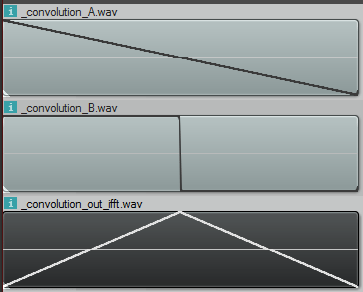
That result is definitely not right. First of all, the convolution is the same length as the inputs, when it should be length(a)+length(b)-1 samples. Basically it should be twice as long as it is.

Secondly, that is not what the convolution looks like. Doing convolution in the time domain of those samples looks like this:

So what’s the deal? Well as it turns out, when you do multiplication in the frequency domain, you are really doing CIRCULAR convolution, which is a bit different than the convolution i described before which is LINEAR convolution. Circular convolution is essentially used for cyclical data (or functions) and basically makes it so that if you try to read “out of bounds”, it will wrap around and use an in bounds value instead. It’s kind of like “texture wrap” if you are a graphics person.

Normally how this is gotten around, when doing convolution in the frequency domain, is to put a bunch of zeros on the end of your time domain samples before you bring them into the frequency domain. You pad them with those zeros to be the correct size (length(a)+length(b)-1, or longer is fine too) and then when you end up doing the “circular convolution”, there are no “out of bounds” values looked at, and you end up with the linear convolution output, even though you technically did circular convolution.

Unfortunately, since we are STARTING in frequency domain and have no time domain samples to bad before going into frequency domain, we are basically out of luck. I’ve tried asking DSP experts and nobody I talked to knows of a way to start in frequency domain and zero pad the time domain so that you could do a linear convolution – at least nobody knows of GENERAL case solution.

Those same experts though say that circular convolution isn’t a bad thing, and is many times exactly what you want to do, or is a fine stand in for linear convolution. I’m sure we’ll explore that in a future post (:

In the example code, i also have the code generate the circular convolution in the time domain so that you can confirm that circular convolution is really what is going on in the above image, when working in frequency domain.

Strike Two IFFT!

Luckily using IDFT to generate sounds (sometimes called Fourier Synthesis) isn’t across the board a losing strategy. If you want a static, repeating wave form, it can be really nice. Or, for dynamic waave forms, if you change your amplitude only a very small amount across window samples, it won’t noticeably degrade the quality of your audio.

The neat thing about IFFT is that it’s a “constant time process”. When using oscillators, the more frequencies you want to appear, the more computationally expensive it gets. With IFFT, it doesn’t matter if all the bins are full or empty or somewhere inbetween, it has the same computational complexity.

Here’s a non trivial sound generated both with IFFT and Oscillators. The difference is pretty negligible right?

alien_ifft.wav – made with IFFT
alien_osci.wav – made with oscillators

Sample Code

#define _CRT_SECURE_NO_WARNINGS
  
#include 
#include 
#include 
#include 
#include 
#include 
#include 
#include 
#include 
#include 
#include 
#include 
  
#define _USE_MATH_DEFINES
#include 
  
//=====================================================================================
// SNumeric - uses phantom types to enforce type safety
//=====================================================================================
template 
struct SNumeric
{
public:
    explicit SNumeric(const T &value) : m_value(value) { }
    SNumeric() : m_value() { }
    inline T& Value() { return m_value; }
    inline const T& Value() const { return m_value; }
  
    typedef SNumeric TType;
    typedef T TInnerType;
  
    // Math Operations
    TType operator+ (const TType &b) const
    {
        return TType(this->Value() + b.Value());
    }
  
    TType operator- (const TType &b) const
    {
        return TType(this->Value() - b.Value());
    }
  
    TType operator* (const TType &b) const
    {
        return TType(this->Value() * b.Value());
    }
  
    TType operator/ (const TType &b) const
    {
        return TType(this->Value() / b.Value());
    }

    TType operator% (const TType &b) const
    {
        return TType(this->Value() % b.Value());
    }
  
    TType& operator+= (const TType &b)
    {
        Value() += b.Value();
        return *this;
    }
  
    TType& operator-= (const TType &b)
    {
        Value() -= b.Value();
        return *this;
    }
  
    TType& operator*= (const TType &b)
    {
        Value() *= b.Value();
        return *this;
    }
  
    TType& operator/= (const TType &b)
    {
        Value() /= b.Value();
        return *this;
    }
  
    TType& operator++ ()
    {
        Value()++;
        return *this;
    }
  
    TType& operator-- ()
    {
        Value()--;
        return *this;
    }
  
    // Extended Math Operations
    template 
    T Divide(const TType &b)
    {
        return ((T)this->Value()) / ((T)b.Value());
    }
  
    // Logic Operations
    bool operatorValue() < b.Value();
    }
    bool operatorValue()  (const TType &b) const {
        return this->Value() > b.Value();
    }
    bool operator>= (const TType &b) const {
        return this->Value() >= b.Value();
    }
    bool operator== (const TType &b) const {
        return this->Value() == b.Value();
    }
    bool operator!= (const TType &b) const {
        return this->Value() != b.Value();
    }
  
private:
    T m_value;
};
  
//=====================================================================================
// Typedefs
//=====================================================================================
  
typedef uint8_t uint8;
typedef uint16_t uint16;
typedef uint32_t uint32;
typedef int16_t int16;
typedef int32_t int32;
  
// type safe types!
typedef SNumeric        TFrequency;
typedef SNumeric           TFFTBin;
typedef SNumeric          TTimeMs;
typedef SNumeric            TTimeS;
typedef SNumeric         TSamples;
typedef SNumeric     TFractionalSamples;
typedef SNumeric         TDecibels;
typedef SNumeric        TAmplitude;
typedef SNumeric          TRadians;
typedef SNumeric          TDegrees;
  
//=====================================================================================
// Constants
//=====================================================================================

static const float c_pi = (float)M_PI;
static const float c_twoPi = c_pi * 2.0f;

//=====================================================================================
// Structs
//=====================================================================================
  
struct SSoundSettings
{
    TSamples        m_sampleRate;
    TSamples        m_sampleCount;
};
  
//=====================================================================================
// Conversion Functions
//=====================================================================================

inline TFFTBin FrequencyToFFTBin(TFrequency frequency, TFFTBin numBins, TSamples sampleRate)
{
    // bin = frequency * numBin / sampleRate
    return TFFTBin((uint32)(frequency.Value() * (float)numBins.Value() / (float)sampleRate.Value()));
}

inline TFrequency FFTBinToFrequency(TFFTBin bin, TFFTBin numBins, TSamples sampleRate)
{
    // frequency = bin * SampleRate / numBins
    return TFrequency((float)bin.Value() * (float)sampleRate.Value() / (float)numBins.Value());
}

inline TRadians DegreesToRadians(TDegrees degrees)
{
    return TRadians(degrees.Value() * c_pi / 180.0f);
}

inline TDegrees RadiansToDegrees(TRadians radians)
{
    return TDegrees(radians.Value() * 180.0f / c_pi);
}

inline TDecibels AmplitudeToDB(TAmplitude volume)
{
    return TDecibels(20.0f * log10(volume.Value()));
}
  
inline TAmplitude DBToAmplitude(TDecibels dB)
{
    return TAmplitude(pow(10.0f, dB.Value() / 20.0f));
}

TTimeS SamplesToSeconds(const SSoundSettings &s, TSamples samples)
{
    return TTimeS(samples.Divide(s.m_sampleRate));
}
  
TSamples SecondsToSamples(const SSoundSettings &s, TTimeS seconds)
{
    return TSamples((int)(seconds.Value() * (float)s.m_sampleRate.Value()));
}
  
TSamples MilliSecondsToSamples(const SSoundSettings &s, TTimeMs milliseconds)
{
    return SecondsToSamples(s, TTimeS((float)milliseconds.Value() / 1000.0f));
}
  
TTimeMs SecondsToMilliseconds(TTimeS seconds)
{
    return TTimeMs((uint32)(seconds.Value() * 1000.0f));
}
  
TFrequency Frequency(float octave, float note)
{
    /* frequency = 440×(2^(n/12))
    Notes:
    0  = A
    1  = A#
    2  = B
    3  = C
    4  = C#
    5  = D
    6  = D#
    7  = E
    8  = F
    9  = F#
    10 = G
    11 = G# */
    return TFrequency((float)(440 * pow(2.0, ((double)((octave - 4) * 12 + note)) / 12.0)));
}
  
template 
T AmplitudeToAudioSample(const TAmplitude& in)
{
    const T c_min = std::numeric_limits::min();
    const T c_max = std::numeric_limits::max();
    const float c_minFloat = (float)c_min;
    const float c_maxFloat = (float)c_max;
  
    float ret = in.Value() * c_maxFloat;
  
    if (ret  c_maxFloat)
        return c_max;
  
    return (T)ret;
}

//=====================================================================================
// Audio Utils
//=====================================================================================

void EnvelopeSamples(std::vector& samples, TSamples envelopeTimeFrontBack)
{
    const TSamples c_frontEnvelopeEnd(envelopeTimeFrontBack);
    const TSamples c_backEnvelopeStart(samples.size() - envelopeTimeFrontBack.Value());

    for (TSamples index(0), numSamples(samples.size()); index < numSamples; ++index)
    {
        // calculate envelope
        TAmplitude envelope(1.0f);
        if (index < c_frontEnvelopeEnd)
            envelope = TAmplitude(index.Divide(envelopeTimeFrontBack));
        else if (index > c_backEnvelopeStart)
            envelope = TAmplitude(1.0f) - TAmplitude((index - c_backEnvelopeStart).Divide(envelopeTimeFrontBack));

        // apply envelope
        samples[index.Value()] *= envelope;
    }
}
  
void NormalizeSamples(std::vector& samples, TAmplitude maxAmplitude)
{
    // nothing to do if no samples
    if (samples.size() == 0)
        return;
  
    // 1) find the largest absolute value in the samples.
    TAmplitude largestAbsVal = TAmplitude(abs(samples.front().Value()));
    std::for_each(samples.begin() + 1, samples.end(), [&largestAbsVal](const TAmplitude &a)
        {
            TAmplitude absVal = TAmplitude(abs(a.Value()));
            if (absVal > largestAbsVal)
                largestAbsVal = absVal;
        }
    );
  
    // 2) adjust largestAbsVal so that when we divide all samples, none will be bigger than maxAmplitude
    // if the value we are going to divide by is <= 0, bail out
    largestAbsVal /= maxAmplitude;
    if (largestAbsVal <= TAmplitude(0.0f))
        return;
  
    // 3) divide all numbers by the largest absolute value seen so all samples are [-maxAmplitude,+maxAmplitude]
    for (TSamples index(0), numSamples(samples.size()); index < numSamples; ++index)
        samples[index.Value()] = samples[index.Value()] / largestAbsVal;
}

//=====================================================================================
// Wave File Writing Code
//=====================================================================================
struct SMinimalWaveFileHeader
{
    //the main chunk
    unsigned char m_szChunkID[4];      //0
    uint32        m_nChunkSize;        //4
    unsigned char m_szFormat[4];       //8
  
    //sub chunk 1 "fmt "
    unsigned char m_szSubChunk1ID[4];  //12
    uint32        m_nSubChunk1Size;    //16
    uint16        m_nAudioFormat;      //18
    uint16        m_nNumChannels;      //20
    uint32        m_nSampleRate;       //24
    uint32        m_nByteRate;         //28
    uint16        m_nBlockAlign;       //30
    uint16        m_nBitsPerSample;    //32
  
    //sub chunk 2 "data"
    unsigned char m_szSubChunk2ID[4];  //36
    uint32        m_nSubChunk2Size;    //40
  
    //then comes the data!
};
  
//this writes a wave file
template 
bool WriteWaveFile(const char *fileName, const std::vector &samples, const SSoundSettings &sound)
{
    //open the file if we can
    FILE *file = fopen(fileName, "w+b");
    if (!file)
        return false;
  
    //calculate bits per sample and the data size
    const int32 bitsPerSample = sizeof(T) * 8;
    const int dataSize = samples.size() * sizeof(T);
  
    SMinimalWaveFileHeader waveHeader;
  
    //fill out the main chunk
    memcpy(waveHeader.m_szChunkID, "RIFF", 4);
    waveHeader.m_nChunkSize = dataSize + 36;
    memcpy(waveHeader.m_szFormat, "WAVE", 4);
  
    //fill out sub chunk 1 "fmt "
    memcpy(waveHeader.m_szSubChunk1ID, "fmt ", 4);
    waveHeader.m_nSubChunk1Size = 16;
    waveHeader.m_nAudioFormat = 1;
    waveHeader.m_nNumChannels = 1;
    waveHeader.m_nSampleRate = sound.m_sampleRate.Value();
    waveHeader.m_nByteRate = sound.m_sampleRate.Value() * 1 * bitsPerSample / 8;
    waveHeader.m_nBlockAlign = 1 * bitsPerSample / 8;
    waveHeader.m_nBitsPerSample = bitsPerSample;
  
    //fill out sub chunk 2 "data"
    memcpy(waveHeader.m_szSubChunk2ID, "data", 4);
    waveHeader.m_nSubChunk2Size = dataSize;
  
    //write the header
    fwrite(&waveHeader, sizeof(SMinimalWaveFileHeader), 1, file);
  
    //write the wave data itself, converting it from float to the type specified
    std::vector outSamples;
    outSamples.resize(samples.size());
    for (size_t index = 0; index < samples.size(); ++index)
        outSamples[index] = AmplitudeToAudioSample(samples[index]);
    fwrite(&outSamples[0], dataSize, 1, file);
  
    //close the file and return success
    fclose(file);
    return true;
}

//=====================================================================================
// FFT / IFFT
//=====================================================================================

// Thanks RosettaCode.org!
// http://rosettacode.org/wiki/Fast_Fourier_transform#C.2B.2B
// In production you'd probably want a non recursive algorithm, but this works fine for us

// for use with FFT and IFFT
typedef std::complex Complex;
typedef std::valarray CArray;

// Cooley–Tukey FFT (in-place)
void fft(CArray& x)
{
    const size_t N = x.size();
    if (N <= 1) return;
 
    // divide
    CArray even = x[std::slice(0, N/2, 2)];
    CArray  odd = x[std::slice(1, N/2, 2)];
 
    // conquer
    fft(even);
    fft(odd);
 
    // combine
    for (size_t k = 0; k < N/2; ++k)
    {
        Complex t = std::polar(1.0f, -2 * c_pi * k / N) * odd[k];
        x[k    ] = even[k] + t;
        x[k+N/2] = even[k] - t;
    }
}
 
// inverse fft (in-place)
void ifft(CArray& x)
{
    // conjugate the complex numbers
    x = x.apply(std::conj);
 
    // forward fft
    fft( x );
 
    // conjugate the complex numbers again
    x = x.apply(std::conj);
 
    // scale the numbers
    x /= (float)x.size();
}

//=====================================================================================
// Wave forms
//=====================================================================================

void SineWave(CArray &frequencies, TFFTBin bin, TRadians startingPhase)
{
    // set up the single harmonic
    frequencies[bin.Value()] = std::polar(1.0f, startingPhase.Value());
}

void SawWave(CArray &frequencies, TFFTBin bin, TRadians startingPhase)
{
    // set up each harmonic
    const float volumeAdjustment = 2.0f / c_pi;
    const size_t bucketWalk = bin.Value();
    for (size_t harmonic = 1, bucket = bin.Value(); bucket < frequencies.size() / 2; ++harmonic, bucket += bucketWalk)
        frequencies[bucket] = std::polar(volumeAdjustment / (float)harmonic, startingPhase.Value());
}

void SquareWave(CArray &frequencies, TFFTBin bin, TRadians startingPhase)
{
    // set up each harmonic
    const float volumeAdjustment = 4.0f / c_pi;
    const size_t bucketWalk = bin.Value() * 2;
    for (size_t harmonic = 1, bucket = bin.Value(); bucket < frequencies.size() / 2; harmonic += 2, bucket += bucketWalk)
        frequencies[bucket] = std::polar(volumeAdjustment / (float)harmonic, startingPhase.Value());
}

void TriangleWave(CArray &frequencies, TFFTBin bin, TRadians startingPhase)
{
    // set up each harmonic
    const float volumeAdjustment = 8.0f / (c_pi*c_pi);
    const size_t bucketWalk = bin.Value() * 2;
    for (size_t harmonic = 1, bucket = bin.Value(); bucket < frequencies.size() / 2; harmonic += 2, bucket += bucketWalk, startingPhase *= TRadians(-1.0f))
        frequencies[bucket] = std::polar(volumeAdjustment / ((float)harmonic*(float)harmonic), startingPhase.Value());
}

void NoiseWave(CArray &frequencies, TFFTBin bin, TRadians startingPhase)
{
    // give a random amplitude and phase to each frequency
    for (size_t bucket = 0; bucket < frequencies.size() / 2; ++bucket)
    {
        float amplitude = static_cast  (rand()) / static_cast  (RAND_MAX);
        float phase = 2.0f * c_pi * static_cast  (rand()) / static_cast  (RAND_MAX);
        frequencies[bucket] = std::polar(amplitude, phase);
    }
}

//=====================================================================================
// Tests
//=====================================================================================

template 
void ConsantBins(
    const W &waveForm,
    TFrequency &frequency,
    bool repeat,
    const char *fileName,
    bool normalize,
    TAmplitude multiplier,
    TRadians startingPhase = DegreesToRadians(TDegrees(270.0f))
)
{
    const TFFTBin c_numBins(4096);

    //our desired sound parameters
    SSoundSettings sound;
    sound.m_sampleRate = TSamples(44100);
    sound.m_sampleCount = MilliSecondsToSamples(sound, TTimeMs(500));

    // allocate space for the output file and initialize it
    std::vector samples;
    samples.resize(sound.m_sampleCount.Value());
    std::fill(samples.begin(), samples.end(), TAmplitude(0.0f));

    // make test data
    CArray data(c_numBins.Value());
    waveForm(data, FrequencyToFFTBin(frequency, c_numBins, sound.m_sampleRate), startingPhase);

    // inverse fft - convert from frequency domain (frequencies) to time domain (samples)
    // need to scale up amplitude before fft
    data *= (float)data.size();
    ifft(data);

    // convert to samples
    if (repeat)
    {
        //repeat results in the output buffer
        size_t dataSize = data.size();
        for (size_t i = 0; i < samples.size(); ++i)
            samples[i] = TAmplitude((float)data[i%dataSize].real());
    }
    else
    {
        //put results in the output buffer once.  Useful for debugging / visualization
        for (size_t i = 0; i < samples.size() && i < data.size(); ++i)
            samples[i] = TAmplitude((float)data[i].real());
    }

    // normalize our samples if we should
    if (normalize)
        NormalizeSamples(samples, DBToAmplitude(TDecibels(-3.0f)));

    // apply the multiplier passed in
    std::for_each(samples.begin(), samples.end(), [&](TAmplitude& amplitude) {
        amplitude *= multiplier;
    });

    // write the wave file
    WriteWaveFile(fileName, samples, sound);
}

void Convolve_Circular(const std::vector& a, const std::vector& b, std::vector& result)
{
    // NOTE: Written for readability, not efficiency
    TSamples ASize(a.size());
    TSamples BSize(b.size());

    // NOTE: the circular convolution result doesn't have to be the size of a, i just chose this size to match the ifft
    // circular convolution output.
    result.resize(ASize.Value());
    std::fill(result.begin(), result.end(), TAmplitude(0.0f));

    for (TSamples outputSampleIndex(0), numOutputSamples(ASize); outputSampleIndex < numOutputSamples; ++outputSampleIndex)
    {
        TAmplitude &outputSample = result[outputSampleIndex.Value()];
        for (TSamples sampleIndex(0), numSamples(ASize); sampleIndex < numSamples; ++sampleIndex)
        {
            TSamples BIndex = (outputSampleIndex + ASize - sampleIndex) % ASize;
            if (BIndex < BSize)
            {
                const TAmplitude &ASample = a[sampleIndex.Value()];
                const TAmplitude &BSample = b[BIndex.Value()];
                outputSample += BSample * ASample;
            }
        }
    }
}

void Convolve_Linear(const std::vector& a, const std::vector& b, std::vector& result)
{
    // NOTE: Written for readability, not efficiency
    TSamples ASize(a.size());
    TSamples BSize(b.size());

    result.resize(ASize.Value() + BSize.Value() - 1);
    std::fill(result.begin(), result.end(), TAmplitude(0.0f));

    for (TSamples outputSampleIndex(0), numOutputSamples(result.size()); outputSampleIndex < numOutputSamples; ++outputSampleIndex)
    {
        TAmplitude &outputSample = result[outputSampleIndex.Value()];
        for (TSamples sampleIndex(0), numSamples(ASize); sampleIndex = sampleIndex)
            {
                TSamples BIndex = outputSampleIndex - sampleIndex;
                if (BIndex < BSize)
                {
                    const TAmplitude &ASample = a[sampleIndex.Value()];
                    const TAmplitude &BSample = b[BIndex.Value()];
                    outputSample += BSample * ASample;
                }
            }
        }
    }
}


template 
void DoConvolution(const W1 &waveForm1, const W2 &waveForm2)
{
    const TFFTBin c_numBins(4096);

    //our desired sound parameters
    SSoundSettings sound;
    sound.m_sampleRate = TSamples(44100);
    sound.m_sampleCount = TSamples(c_numBins.Value());

    // make the frequency data for wave form 1
    CArray data1(c_numBins.Value());
    waveForm1(data1, TFFTBin(1), DegreesToRadians(TDegrees(270.0f)));

    // make the frequency data for wave form 2
    CArray data2(c_numBins.Value());
    waveForm2(data2, TFFTBin(1), DegreesToRadians(TDegrees(270.0f)));

    // do circular convolution in time domain by doing multiplication in the frequency domain
    CArray data3(c_numBins.Value());
    data3 = data1 * data2;

    // write out the first convolution input (in time domain samples)
    std::vector samples1;
    samples1.resize(sound.m_sampleCount.Value());
    std::fill(samples1.begin(), samples1.end(), TAmplitude(0.0f));
    {
        data1 *= (float)data1.size();
        ifft(data1);

        // convert to samples
        for (size_t i = 0; i < samples1.size() && i < data1.size(); ++i)
            samples1[i] = TAmplitude((float)data1[i].real());

        // write the wave file
        WriteWaveFile("_convolution_A.wav", samples1, sound);
    }

    // write out the second convolution input (in time domain samples)
    std::vector samples2;
    samples2.resize(sound.m_sampleCount.Value());
    std::fill(samples2.begin(), samples2.end(), TAmplitude(0.0f));
    {
        data2 *= (float)data2.size();
        ifft(data2);

        // convert to samples
        for (size_t i = 0; i < samples2.size() && i < data2.size(); ++i)
            samples2[i] = TAmplitude((float)data2[i].real());

        // write the wave file
        WriteWaveFile("_convolution_B.wav", samples2, sound);
    }

    // write the result of the convolution (in time domain samples)
    {
        data3 *= (float)data3.size();
        ifft(data3);

        // convert to samples
        std::vector samples3;
        samples3.resize(sound.m_sampleCount.Value());
        for (size_t i = 0; i < samples3.size() && i < data3.size(); ++i)
            samples3[i] = TAmplitude((float)data3[i].real());

        // write the wave file
        NormalizeSamples(samples3, TAmplitude(1.0f));
        WriteWaveFile("_convolution_out_ifft.wav", samples3, sound);
    }

    // do linear convolution in the time domain and write out the wave file
    {
        std::vector samples4;
        Convolve_Linear(samples1, samples2, samples4);
        NormalizeSamples(samples4, TAmplitude(1.0f));
        WriteWaveFile("_convolution_out_lin.wav", samples4, sound);
    }

    // do circular convolution in time domain and write out the wave file
    {
        std::vector samples4;
        Convolve_Circular(samples1, samples2, samples4);
        NormalizeSamples(samples4, TAmplitude(1.0f));
        WriteWaveFile("_convolution_out_cir.wav", samples4, sound);
    }
}

//=====================================================================================
// Frequency Over Time Track Structs
//=====================================================================================

struct SBinTrack
{
    SBinTrack() { }

    SBinTrack(
        TFFTBin bin,
        std::function amplitudeFunction,
        TRadians phase = DegreesToRadians(TDegrees(270.0f))
    )
        : m_bin(bin)
        , m_amplitudeFunction(amplitudeFunction)
        , m_phase(phase) {}

    TFFTBin                                     m_bin;
    std::function   m_amplitudeFunction;
    TRadians                                    m_phase;
};

//=====================================================================================
// Frequency Amplitude Over Time Test
//=====================================================================================

void TracksToSamples_IFFT_Window(const std::vector &tracks, CArray &windowData, TTimeS time, TTimeS totalTime)
{
    // clear out the window data
    windowData = Complex(0.0f, 0.0f);

    // gather the bin data
    std::for_each(tracks.begin(), tracks.end(), [&](const SBinTrack &track) {
        windowData[track.m_bin.Value()] = std::polar(track.m_amplitudeFunction(time, totalTime).Value(), track.m_phase.Value());
    });

    // convert it to time samples
    windowData *= (float)windowData.size();
    ifft(windowData);
}

void TracksToSamples_IFFT(const std::vector &tracks, std::vector &samples, TTimeS totalTime, TFFTBin numBins)
{
    // convert the tracks to samples, one window of numBins at a time
    CArray windowData(numBins.Value());
    for (TSamples startSample(0), numSamples(samples.size()); startSample < numSamples; startSample += TSamples(numBins.Value()))
    {
        // Convert the tracks that we can into time samples using ifft
        float percent = startSample.Divide(numSamples);
        TTimeS time(totalTime.Value() * percent);
        TracksToSamples_IFFT_Window(tracks, windowData, time, totalTime);

        // convert window data to samples
        const size_t numWindowSamples = std::min(numBins.Value(), (numSamples - startSample).Value());
        for (size_t i = 0; i < numWindowSamples; ++i)
            samples[startSample.Value() + i] = TAmplitude((float)windowData[i].real());
    }
}

void TracksToSamples_Oscilators(const std::vector &tracks, std::vector &samples, TTimeS totalTime, TFFTBin numBins)
{
    // Render each time/amplitude track in each frequency bin to actual cosine samples
    float samplesPerSecond = (float)samples.size() / totalTime.Value();
    float ratio = samplesPerSecond / (float)numBins.Value();
    for (size_t i = 0, c = samples.size(); i < c; ++i)
    {
        float percent = (float)i / (float)c;
        TTimeS time(totalTime.Value() * percent);
        samples[i].Value() = 0.0f;
        std::for_each(tracks.begin(), tracks.end(),
            [&](const SBinTrack &track)
            {
                TAmplitude amplitude = track.m_amplitudeFunction(time, totalTime);
                samples[i] += TAmplitude(cos(time.Value()*c_twoPi*ratio*(float)track.m_bin.Value() + track.m_phase.Value())) * amplitude;
            }
        );
    }
}

struct SFadePair
{
    TTimeS m_time;
    TAmplitude m_amplitude;
};

std::function MakeFadeFunction(std::initializer_list fadePairs)
{
    // if no faid pairs, 0 amplitude always
    if (fadePairs.size() == 0)
    {
        return [](TTimeS time, TTimeS totalTime) -> TAmplitude
        {
            return TAmplitude(0.0f);
        };
    }

    // otherwise, use the fade info to make an amplitude over time track
    // NOTE: assume amplitude 0 at time 0 and totalTime
    return [fadePairs](TTimeS time, TTimeS totalTime) -> TAmplitude
    {
        TTimeS lastFadeTime(0.0f);
        TAmplitude lastFadeAmplitude(0.0f);

        for (size_t i = 0; i < fadePairs.size(); ++i)
        {
            if (time < fadePairs.begin()[i].m_time)
            {
                TAmplitude percent(((time - lastFadeTime) / (fadePairs.begin()[i].m_time - lastFadeTime)).Value());
                return percent * (fadePairs.begin()[i].m_amplitude - lastFadeAmplitude) + lastFadeAmplitude;
            }
            lastFadeTime = fadePairs.begin()[i].m_time;
            lastFadeAmplitude = fadePairs.begin()[i].m_amplitude;
        }
        if (time < totalTime)
        {
            TAmplitude percent(((time - lastFadeTime) / (totalTime - lastFadeTime)).Value());
            return percent * (TAmplitude(0.0f) - lastFadeAmplitude) + lastFadeAmplitude;
        }

        return TAmplitude(0.0f);
    };
}

void DynamicBins(TFFTBin numBins, const std::vector& tracks, const char *fileNameFFT, const char * fileNameOsc)
{
    //our desired sound parameters
    SSoundSettings sound;
    sound.m_sampleRate = TSamples(44100);
    sound.m_sampleCount = MilliSecondsToSamples(sound, TTimeMs(2000));

    // allocate space for the output file and initialize it
    std::vector samples;
    samples.resize(sound.m_sampleCount.Value());
    std::fill(samples.begin(), samples.end(), TAmplitude(0.0f));

    const TTimeS totalTime = SamplesToSeconds(sound, sound.m_sampleCount);

    // convert our frequency over time descriptions to time domain samples using IFFT
    if (fileNameFFT)
    {
        TracksToSamples_IFFT(tracks, samples, totalTime, numBins);
        NormalizeSamples(samples, DBToAmplitude(TDecibels(-3.0f)));
        EnvelopeSamples(samples, MilliSecondsToSamples(sound, TTimeMs(50)));
        WriteWaveFile(fileNameFFT, samples, sound);
    }

    // convert our frequency over time descriptions to time domain samples using Oscillators
    // and additive synthesis
    if (fileNameOsc)
    {
        TracksToSamples_Oscilators(tracks, samples, totalTime, numBins);
        NormalizeSamples(samples, DBToAmplitude(TDecibels(-3.0f)));
        EnvelopeSamples(samples, MilliSecondsToSamples(sound, TTimeMs(50)));
        WriteWaveFile(fileNameOsc, samples, sound);
    }
}

//=====================================================================================
// Main
//=====================================================================================
int main(int argc, char **argv)
{
     // make some basic wave forms with IFFT
    ConsantBins(NoiseWave, Frequency(3, 8), true, "_noise.wav", true, TAmplitude(1.0f));
    ConsantBins(SquareWave, Frequency(3, 8), true, "_square.wav", true, TAmplitude(1.0f));
    ConsantBins(TriangleWave, Frequency(3, 8), true, "_triangle.wav", true, TAmplitude(1.0f));
    ConsantBins(SawWave, Frequency(3, 8), true, "_saw.wav", true, TAmplitude(1.0f));
    ConsantBins(SineWave, Frequency(3, 8), true, "_cosine.wav", true, TAmplitude(1.0f), TRadians(0.0f));
    ConsantBins(SineWave, Frequency(3, 8), true, "_sine.wav", true, TAmplitude(1.0f));

    // show saw wave phase shifted.  Looks different but sounds the same!
    // You can do the same with square, saw, triangle (and other more complex wave forms)
    // We take the saw waves down 12 db though because some variations have large peaks so would clip otherwise.
    // we don't normalize because we want you to hear them all at the same loudness to tell that they really do sound the same.
    ConsantBins(SawWave, Frequency(3, 8), true, "_saw_0.wav"  , false, DBToAmplitude(TDecibels(-12.0f)), DegreesToRadians(TDegrees(0.0f)));
    ConsantBins(SawWave, Frequency(3, 8), true, "_saw_15.wav" , false, DBToAmplitude(TDecibels(-12.0f)), DegreesToRadians(TDegrees(15.0f)));
    ConsantBins(SawWave, Frequency(3, 8), true, "_saw_30.wav" , false, DBToAmplitude(TDecibels(-12.0f)), DegreesToRadians(TDegrees(30.0f)));
    ConsantBins(SawWave, Frequency(3, 8), true, "_saw_45.wav" , false, DBToAmplitude(TDecibels(-12.0f)), DegreesToRadians(TDegrees(45.0f)));
    ConsantBins(SawWave, Frequency(3, 8), true, "_saw_60.wav" , false, DBToAmplitude(TDecibels(-12.0f)), DegreesToRadians(TDegrees(60.0f)));
    ConsantBins(SawWave, Frequency(3, 8), true, "_saw_75.wav" , false, DBToAmplitude(TDecibels(-12.0f)), DegreesToRadians(TDegrees(75.0f)));
    ConsantBins(SawWave, Frequency(3, 8), true, "_saw_90.wav" , false, DBToAmplitude(TDecibels(-12.0f)), DegreesToRadians(TDegrees(90.0f)));
    ConsantBins(SawWave, Frequency(3, 8), true, "_saw_105.wav", false, DBToAmplitude(TDecibels(-12.0f)), DegreesToRadians(TDegrees(105.0f)));
    ConsantBins(SawWave, Frequency(3, 8), true, "_saw_120.wav", false, DBToAmplitude(TDecibels(-12.0f)), DegreesToRadians(TDegrees(120.0f)));
    ConsantBins(SawWave, Frequency(3, 8), true, "_saw_135.wav", false, DBToAmplitude(TDecibels(-12.0f)), DegreesToRadians(TDegrees(135.0f)));
    ConsantBins(SawWave, Frequency(3, 8), true, "_saw_150.wav", false, DBToAmplitude(TDecibels(-12.0f)), DegreesToRadians(TDegrees(150.0f)));
    ConsantBins(SawWave, Frequency(3, 8), true, "_saw_165.wav", false, DBToAmplitude(TDecibels(-12.0f)), DegreesToRadians(TDegrees(165.0f)));
    ConsantBins(SawWave, Frequency(3, 8), true, "_saw_180.wav", false, DBToAmplitude(TDecibels(-12.0f)), DegreesToRadians(TDegrees(180.0f)));
    ConsantBins(SawWave, Frequency(3, 8), true, "_saw_270.wav", false, DBToAmplitude(TDecibels(-12.0f)), DegreesToRadians(TDegrees(270.0f)));

    // show how IFFT can have popping at window edges
    {
        std::vector tracks;
        tracks.emplace_back(SBinTrack(TFFTBin(10), [](TTimeS time, TTimeS totalTime) -> TAmplitude
        {
            return TAmplitude(cos(time.Value()*c_twoPi*4.0f) * 0.5f + 0.5f);
        }));

        // make a version that starts at a phase of 0 degrees and has popping at the
        // edges of each IFFT window
        tracks.front().m_phase = TRadians(0.0f);
        DynamicBins(TFFTBin(1024), tracks, "_IFFTTest1.wav", nullptr);

        // make a version that starts at a phase of 270 degrees and is smooth at the
        // edges of each IFFT window but can only change amplitude at the edges of
        // each window.
        tracks.front().m_phase = TRadians(DegreesToRadians(TDegrees(270.0f)));
        DynamicBins(TFFTBin(1024), tracks, "_IFFTTest2.wav", nullptr);

        // make a version with oscillators and additive synthesis which has no
        // popping and can also change amplitude anywhere in the wave form.
        DynamicBins(TFFTBin(1024), tracks, nullptr, "_IFFTTest3.wav");
    }

    // make an alien sound using both IFFT and oscillators (additive synthesis)
    {
        std::vector tracks;
        tracks.emplace_back(SBinTrack(TFFTBin(1), MakeFadeFunction({ { TTimeS(0.5f), TAmplitude(1.0f) }, { TTimeS(1.0f), TAmplitude(0.5f) } })));
        tracks.emplace_back(SBinTrack(TFFTBin(2), MakeFadeFunction({ { TTimeS(1.0f), TAmplitude(1.0f) } })));
        tracks.emplace_back(SBinTrack(TFFTBin(3), MakeFadeFunction({ { TTimeS(1.5f), TAmplitude(1.0f) } })));
        tracks.emplace_back(SBinTrack(TFFTBin(5), MakeFadeFunction({ { TTimeS(1.25f), TAmplitude(1.0f) } })));
        tracks.emplace_back(SBinTrack(TFFTBin(10), [](TTimeS time, TTimeS totalTime) -> TAmplitude
        {
            float value = (cos(time.Value()*c_twoPi*4.0f) * 0.5f + 0.5f) * 0.5f;
            if (time < totalTime * TTimeS(0.5f))
                value *= (time / (totalTime*TTimeS(0.5f))).Value();
            else
                value *= 1.0f - ((time - totalTime*TTimeS(0.5f)) / (totalTime*TTimeS(0.5f))).Value();
            return TAmplitude(value);
        }));
        DynamicBins(TFFTBin(1024), tracks, "_alien_ifft.wav", "_alien_osc.wav");
    }

    // Make some drum beats
    {
        // frequency = bin * SampleRate / numBins
        // frequency = bin * 44100 / 4096
        // frequency ~= bin * 10.75
        // up to 22050hz at bin 2048

        TFFTBin c_numBins(4096);
        TSamples c_sampleRate(44100);

        std::vector tracks;

        const TTimeS timeMultiplier(1.1f);

        // base drum: 100-200hz every half second
        {
            const TFFTBin start(FrequencyToFFTBin(TFrequency(100.0f), c_numBins, c_sampleRate));
            const TFFTBin end(FrequencyToFFTBin(TFrequency(200.0f), c_numBins, c_sampleRate));
            const TFFTBin step(5);

            auto beat = [&](TTimeS time, TTimeS totalTime)->TAmplitude
            {
                time *= timeMultiplier;
                time = TTimeS(std::fmod(time.Value(), 0.5f));
                const TTimeS attack(0.01f);
                const TTimeS release(TTimeS(0.2f) - attack);
                const TTimeS totalBeatTime(attack + release);

                TAmplitude ret;
                if (time < attack)
                    ret = TAmplitude(time.Divide(attack));
                else if (time < totalBeatTime)
                    ret = TAmplitude(1.0f) - TAmplitude((time - attack).Divide(release));
                else
                    ret = TAmplitude(0.0f);
                return ret * TAmplitude(10.0f);
            };
            for (TFFTBin i = start; i TAmplitude
            {
                time *= timeMultiplier;
                time = TTimeS(std::fmod(time.Value() + 0.25f, 1.0f));
                const TTimeS attack(0.025f);
                const TTimeS release(TTimeS(0.075f) - attack);
                const TTimeS totalBeatTime(attack + release);

                TAmplitude ret;
                if (time < attack)
                    ret = TAmplitude(time.Divide(attack));
                else if (time < totalBeatTime)
                    ret = TAmplitude(1.0f) - TAmplitude((time - attack).Divide(release));
                else
                    ret = TAmplitude(0.0f);
                return ret;
            };
            for (TFFTBin i = start; i TAmplitude
            {
                time *= timeMultiplier;
                time = TTimeS(std::fmod(time.Value() + 0.75f, 1.0f));
                const TTimeS attack(0.025f);
                const TTimeS release(TTimeS(0.075f) - attack);
                const TTimeS totalBeatTime(attack + release);

                TAmplitude ret;
                if (time < attack)
                    ret = TAmplitude(time.Divide(attack));
                else if (time < totalBeatTime)
                    ret = TAmplitude(1.0f) - TAmplitude((time - attack).Divide(release));
                else
                    ret = TAmplitude(0.0f);
                return ret;
            };
            for (TFFTBin i = start; i <= end; i += step)
                tracks.emplace_back(SBinTrack(i, beat));
        }

        // render the result with both ifft and oscillators
        DynamicBins(c_numBins, tracks, "_drums_ifft.wav", "_drums_osc.wav");
    }

    // do our convolution tests
    DoConvolution(SawWave, SquareWave);

    return 0;
}

Links

So, frequency domain audio synthesis with IFFT is kind of a mixed bag. It can be good so long as you are ok with it’s limitations, but if you aren’t, it’s better to stick to oscillators and do additive synthesis.

Working in the frequency domain in general is pretty cool though. If you bust out a spectrograph and analyze the frequency of a type of sound, once you understand the frequency domain makeup of that sound, you can go back and synthesize it yourself using either oscillators or IFFT. You can go down this route to make your own synth guitar sound, or trumpet, or you could try to mimic sound effects. The world is your oyster! Well, almost… things like “voice synthesis” are actually pretty complex, and this method for matching musical instruments will only get you so far. More to come in future posts!

Here are some links to dive a bit deeper into this stuff:

I think I might be burned out on audio for a while, my thoughts are turning towards graphics so look for some graphics posts soon 😛
Decibels (dB) and Amplitude

If you are a programmer, chances are that when you think of volume or volume adjustments of audio signals (or other streams of data), you are thinking in terms of amplitude.

For instance, to make an audio stream quieter, you are probably going to multiply all the samples by 0.5 to bring it down in volume. That 0.5 is a scalar value in amplitude space.

If you work with musicians or other audio folk, chances are they are not going to think in amplitude, may not be able to easily adjust to thinking in amplitude, and instead will talk to you in terms of decibels or dB, which is as foreign to you as amplitude is to them.

The main issue is that our ears do not hear linear adjustments in amplitude as linear adjustments in loudness, but linear adjustments in dB do sound like they are linear adjustments in loudness.

dB is a bit easier to understand as well. 0dB means full volume and positive numbers means a boost in volume, while negative numbers mean a decrease in volume.

dB combines linearly, unlike amplitudes which have to multiply together. -6db means that the volume has been cut in half, and -12db means that it has been cut in half again (so is 1/4 as loud) and -18db means that it has been cut in half yet again (now 1/8 as loud). Doing the same with amplitude, 0.5 means that the volume is cut in half, and then you multiply that by 0.5 to get 0.25 to make it 1/4 as loud, and multiply again to get 0.125 which is 1/8 as loud.

A fun byproduct of this is that using dB you can never describe zero (silence) exactly. People will usually adopt a convention of saying that below -60dB is silence, or below -96dB is silence. This has a nice side benefit that you can make the cutoff point of “assumed silence” be above the level that floating point denormals are (very small numbers that need special processing and are slower to work with than regular floating point numbers), so that in effect you can use this to remove denormals from your processing, which can boost the performance of your code.

Conversion Functions

To convert from amplitude to dB, the formula is:

dB = 20 * log10(amplitude)

To convert from dB to amplitude, the formula is:

amplitude = 10^(db/20)

Note that when converting audio samples to dB, you want to take the absolute value of the audio sample, since sign doesn’t matter for loudness. -1 and +1 have the same loudness (0dB).

Here’s some c++ code which does those two operations:

inline float AmplitudeTodB(float amplitude)
{
  return 20.0f * log10(amplitude);
}

inline float dBToAmplitude(float dB)
{
  return pow(10.0f, db/20.0f);
}

Conversion Table

Here are some dB values and corresponding amplitude values to help you better understand how dB and amplitude are related.

Decreasing Volume:

dB Amplitude
-1 0.891
-3 0.708
-6 0.501
-12 0.251
-18 0.126
-20 0.1
-40 0.01
-60 0.001
-96 0.00002

Increasing Volume:

dB Amplitude
1 1.122
3 1.413
6 1.995
12 3.981
18 7.943
20 10
40 100
60 1000
96 63095.734

Next Up

I’m just about finished doing the research for a fourier synthesis post to show how to use the inverse fourier transform to turn frequency information into audio samples. Look for that in the next couple days!

DIY Synth: Convolution Reverb & 1D Discrete Convolution of Audio Samples

This is a part of the DIY Synthesizer series of posts where each post is roughly built upon the knowledge of the previous posts. If you are lost, check the earlier posts!

I just learned about this technique a couple weeks ago and am SUPER stoked to be able to share this info. Honestly, it’s kind of bad ass and a little magical.

If there is a physical location that has the reverb you are looking for (a church, a cave, your bathroom, the subway, whatever), you can go there and record the sound of some short, loud sound (a clap, a starter pistol, whatever). Now that you have this sound file, you can use a mathematical technique called “Discrete Convolution” (not as difficult as it sounds) to apply that reverb to other sounds.

Not only that, you can use convolution to apply various properties of one sound to another sound. Like you could convolve a saw wave and a recording of a voice and make it sound robotic.

This is pretty cool right?

Convolution

There are two types of convolution out there… continuous convolution and discrete convolution.

Continuous convolution is a method where you can take two formulas and perform some operations (algebra, calculus, etc) to get a third formula.

In the cases that us programmers usually work with, however, you usually only have data, and not a mathematical formula describing that data.

When you have specific data points instead of an equation, you can use something called discrete convolution instead.

Discrete convolution is a method where you take two streams of data (IE two arrays of data!) and perform some operations (only looping, addition and multiplication!) to get a third stream of data.

Interestingly, this third stream of data will be the size of the first stream of data, plus the size of the second stream of data, minus one.

This link explains discrete convolution much better than I could, and even has an interactive demo, so check it out: Discrete Convolution

Here is some pseudo code that shows how discrete convolution works.

// We are calculating bufferA * bufferB (discrete convolution)
// initialize out buffer to empty, and make sure it's the right size
outBuffer[sizeof(bufferA)+sizeof(bufferB)-1] = 0

// reverse one of the buffers in preperation of the convolution
reverse(bufferB);

// Convolve!
for (int outBufferIndex = 0; outBufferIndex < sizeof(outBuffer); ++outBufferIndex)
{
  bufferAIndex = 0;
  bufferBIndex = 0;
  if (outBufferIndex < sizeof(bufferB))
    bufferBIndex = sizeof(bufferB) - outBufferIndex - 1;
  else
    bufferAIndex = outBufferIndex - sizeof(bufferB);

  for (; bufferAIndex < sizeof(bufferA) && bufferBIndex < sizeof(bufferB); ++bufferAIndex, ++bufferBIndex)
  {
    outBuffer[outBufferIndex] += bufferA[bufferAIndex] * bufferB[bufferBIndex];
  }
}

That's all there is to it!

Convolution Reverb

Like I mentioned above, to do convolution reverb you just convolve the audio file you want to add reverb to with the recorded sound from the place that has the reverb you want. That second sound is called the Impulse Response, or IR for short.

Besides letting you choose a reverb model (like “cavernous” or “small hallway” or “bright tiled room”), many reverbs will have a “wetness” parameter that controls how much reverb you hear versus how much of the origional noise you hear. A wetness of 1.0 means all you hear is the reverb (the convolution), while a wetness of 0.0 means all you hear is the origional sound (the dry sound). It’s just a percentage and literally is just used to lerp between the two signals.

Here is an example of how changes in wetness can sound, and also give you a first glimpse of just how good this technique works!

Dry Sound: SoundBite
Impulse Response: ReverbLarge

Convolved with 100% wetness: c_RL_SBite.wav
Convolved with 66% wetness: c_RL_SBite_66.wav
Convolved with 33% wetness: c_RL_SBite_33.wav

Sample Sound Files

Let’s convolve some sounds together and see what results we get!

Here are 11 sounds convoled against each other (and themselves) at 100% wetness so all you hear is the convolution. Convolution is commutative (A*B == B*A) so that cuts down on the number of combinations (66 instead of 121!)

There are 3 impulse responses, 4 short basic wave forms, 2 voice samples a cymbal drum pattern and a jaw harp twang.

Some of the results are pretty interesting, for instance check out SoundBite vs SoundCymbal. The beat of the cymbal pattern remains, but the actual symbal sound itself is replaced by the words!

ReverbLarge
ReverbLarge c_RL_RL.wav
ReverbMedium c_RL_RM.wav
ReverbSmall c_RL_RS.wav
SoundBite c_RL_SBite.wav
SoundCymbal c_RL_SCymbal.wav
SoundJawharp c_RL_SJawharp.wav
SoundLegend c_RL_SLegend.wav
SoundSaw c_RL_SSaw.wav
SoundSine c_RL_SSine.wav
SoundSquare c_RL_SSquare.wav
SoundTriangle c_RL_STriangle.wav
ReverbMedium
ReverbLarge c_RL_RM.wav
ReverbMedium c_RM_RM.wav
ReverbSmall c_RM_RS.wav
SoundBite c_RM_SBite.wav
SoundCymbal c_RM_SCymbal.wav
SoundJawharp c_RM_SJawharp.wav
SoundLegend c_RM_SLegend.wav
SoundSaw c_RM_SSaw.wav
SoundSine c_RM_SSine.wav
SoundSquare c_RM_SSquare.wav
SoundTriangle c_RM_STriangle.wav
ReverbSmall
ReverbLarge c_RL_RS.wav
ReverbMedium c_RM_RS.wav
ReverbSmall c_RS_RS.wav
SoundBite c_RS_SBite.wav
SoundCymbal c_RS_SCymbal.wav
SoundJawharp c_RS_SJawharp.wav
SoundLegend c_RS_SLegend.wav
SoundSaw c_RS_SSaw.wav
SoundSine c_RS_SSine.wav
SoundSquare c_RS_SSquare.wav
SoundTriangle c_RS_STriangle.wav
SoundBite
ReverbLarge c_RL_SBite.wav
ReverbMedium c_RM_SBite.wav
ReverbSmall c_RS_SBite.wav
SoundBite c_SBite_SBite.wav
SoundCymbal c_SBite_SCymbal.wav
SoundJawharp c_SBite_SJawharp.wav
SoundLegend c_SBite_SLegend.wav
SoundSaw c_SBite_SSaw.wav
SoundSine c_SBite_SSine.wav
SoundSquare c_SBite_SSquare.wav
SoundTriangle c_SBite_STriangle.wav
SoundCymbal
ReverbLarge c_RL_SCymbal.wav
ReverbMedium c_RM_SCymbal.wav
ReverbSmall c_RS_SCymbal.wav
SoundBite c_SBite_SCymbal.wav
SoundCymbal c_SCymbal_SCymbal.wav
SoundJawharp c_SCymbal_SJawharp.wav
SoundLegend c_SCymbal_SLegend.wav
SoundSaw c_SCymbal_SSaw.wav
SoundSine c_SCymbal_SSine.wav
SoundSquare c_SCymbal_SSquare.wav
SoundTriangle c_SCymbal_STriangle.wav
SoundJawharp
ReverbLarge c_RL_SJawharp.wav
ReverbMedium c_RM_SJawharp.wav
ReverbSmall c_RS_SJawharp.wav
SoundBite c_SBite_SJawharp.wav
SoundCymbal c_SCymbal_SJawharp.wav
SoundJawharp c_SJawharp_SJawharp.wav
SoundLegend c_SJawharp_SLegend.wav
SoundSaw c_SJawharp_SSaw.wav
SoundSine c_SJawharp_SSine.wav
SoundSquare c_SJawharp_SSquare.wav
SoundTriangle c_SJawharp_STriangle.wav
SoundLegend
ReverbLarge c_RL_SLegend.wav
ReverbMedium c_RM_SLegend.wav
ReverbSmall c_RS_SLegend.wav
SoundBite c_SBite_SLegend.wav
SoundCymbal c_SCymbal_SLegend.wav
SoundJawharp c_SJawharp_SLegend.wav
SoundLegend c_SLegend_SLegend.wav
SoundSaw c_SLegend_SSaw.wav
SoundSine c_SLegend_SSine.wav
SoundSquare c_SLegend_SSquare.wav
SoundTriangle c_SLegend_STriangle.wav
SoundSaw
ReverbLarge c_RL_SSaw.wav
ReverbMedium c_RM_SSaw.wav
ReverbSmall c_RS_SSaw.wav
SoundBite c_SBite_SSaw.wav
SoundCymbal c_SCymbal_SSaw.wav
SoundJawharp c_SJawharp_SSaw.wav
SoundLegend c_SLegend_SSaw.wav
SoundSaw c_SSaw_SSaw.wav
SoundSine c_SSaw_SSine.wav
SoundSquare c_SSaw_SSquare.wav
SoundTriangle c_SSaw_STriangle.wav
SoundSine
ReverbLarge c_RL_SSine.wav
ReverbMedium c_RM_SSine.wav
ReverbSmall c_RS_SSine.wav
SoundBite c_SBite_SSine.wav
SoundCymbal c_SCymbal_SSine.wav
SoundJawharp c_SJawharp_SSine.wav
SoundLegend c_SLegend_SSine.wav
SoundSaw c_SSaw_SSine.wav
SoundSine c_SSine_SSine.wav
SoundSquare c_SSine_SSquare.wav
SoundTriangle c_SSine_STriangle.wav
SoundSquare
ReverbLarge c_RL_SSquare.wav
ReverbMedium c_RM_SSquare.wav
ReverbSmall c_RS_SSquare.wav
SoundBite c_SBite_SSquare.wav
SoundCymbal c_SCymbal_SSquare.wav
SoundJawharp c_SJawharp_SSquare.wav
SoundLegend c_SLegend_SSquare.wav
SoundSaw c_SSaw_SSquare.wav
SoundSine c_SSine_SSquare.wav
SoundSquare c_SSquare_SSquare.wav
SoundTriangle c_SSquare_STriangle.wav
SoundTriangle
ReverbLarge c_RL_STriangle.wav
ReverbMedium c_RM_STriangle.wav
ReverbSmall c_RS_STriangle.wav
SoundBite c_SBite_STriangle.wav
SoundCymbal c_SCymbal_STriangle.wav
SoundJawharp c_SJawharp_STriangle.wav
SoundLegend c_SLegend_STriangle.wav
SoundSaw c_SSaw_STriangle.wav
SoundSine c_SSine_STriangle.wav
SoundSquare c_SSquare_STriangle.wav
SoundTriangle c_STriangle_STriangle.wav

Sample Code

Here is some sample code which will read in “in.wav” and “reverb.wav”, do convolution on them and save the fully wet result (convolution result only, no original in.wav mixed into the output) as “out.wav”.

Note that this code was used to process the sample sound files above. Usual caveat: The sound loading code isn’t bulletproof. I’ve found it works best with 16 bit mono sound files. If you need better sound loading, check out libsndfile!

#define _CRT_SECURE_NO_WARNINGS
 
#include 
#include 
#include 
#include 
#include 
#include 
#include 
#include 
 
#define _USE_MATH_DEFINES
#include 
 
//=====================================================================================
// SNumeric - uses phantom types to enforce type safety
//=====================================================================================
template 
struct SNumeric
{
public:
    explicit SNumeric(const T &value) : m_value(value) { }
    SNumeric() : m_value() { }
    inline T& Value() { return m_value; }
    inline const T& Value() const { return m_value; }
 
    typedef SNumeric TType;
    typedef T TInnerType;
 
    // Math Operations
    TType operator+ (const TType &b) const
    {
        return TType(this->Value() + b.Value());
    }
 
    TType operator- (const TType &b) const
    {
        return TType(this->Value() - b.Value());
    }
 
    TType operator* (const TType &b) const
    {
        return TType(this->Value() * b.Value());
    }
 
    TType operator/ (const TType &b) const
    {
        return TType(this->Value() / b.Value());
    }
 
    TType& operator+= (const TType &b)
    {
        Value() += b.Value();
        return *this;
    }
 
    TType& operator-= (const TType &b)
    {
        Value() -= b.Value();
        return *this;
    }
 
    TType& operator*= (const TType &b)
    {
        Value() *= b.Value();
        return *this;
    }
 
    TType& operator/= (const TType &b)
    {
        Value() /= b.Value();
        return *this;
    }
 
    TType& operator++ ()
    {
        Value()++;
        return *this;
    }
 
    TType& operator-- ()
    {
        Value()--;
        return *this;
    }
 
    // Extended Math Operations
    template 
    T Divide(const TType &b)
    {
        return ((T)this->Value()) / ((T)b.Value());
    }
 
    // Logic Operations
    bool operatorValue() < b.Value();
    }
    bool operatorValue()  (const TType &b) const {
        return this->Value() > b.Value();
    }
    bool operator>= (const TType &b) const {
        return this->Value() >= b.Value();
    }
    bool operator== (const TType &b) const {
        return this->Value() == b.Value();
    }
    bool operator!= (const TType &b) const {
        return this->Value() != b.Value();
    }
 
private:
    T m_value;
};
 
//=====================================================================================
// Typedefs
//=====================================================================================
 
typedef uint8_t uint8;
typedef uint16_t uint16;
typedef uint32_t uint32;
typedef int16_t int16;
typedef int32_t int32;
 
// type safe types!
typedef SNumeric      TFrequency;
typedef SNumeric        TTimeMs;
typedef SNumeric       TSamples;
typedef SNumeric   TFractionalSamples;
typedef SNumeric       TDecibels;
typedef SNumeric      TAmplitude;
typedef SNumeric          TPhase;
 
//=====================================================================================
// Constants
//=====================================================================================
 
static const float c_pi = (float)M_PI;
static const float c_twoPi = c_pi * 2.0f;
 
//=====================================================================================
// Structs
//=====================================================================================
 
struct SSoundSettings
{
    TSamples        m_sampleRate;
};
 
//=====================================================================================
// Conversion Functions
//=====================================================================================
inline TDecibels AmplitudeToDB(TAmplitude volume)
{
    return TDecibels(log10(volume.Value()));
}
 
inline TAmplitude DBToAmplitude(TDecibels dB)
{
    return TAmplitude(pow(10.0f, dB.Value() / 20.0f));
}
 
TSamples SecondsToSamples(const SSoundSettings &s, float seconds)
{
    return TSamples((int)(seconds * (float)s.m_sampleRate.Value()));
}
 
TSamples MilliSecondsToSamples(const SSoundSettings &s, float milliseconds)
{
    return SecondsToSamples(s, milliseconds / 1000.0f);
}
 
TTimeMs SecondsToMilliseconds(float seconds)
{
    return TTimeMs((uint32)(seconds * 1000.0f));
}
 
TFrequency Frequency(float octave, float note)
{
    /* frequency = 440×(2^(n/12))
    Notes:
    0  = A
    1  = A#
    2  = B
    3  = C
    4  = C#
    5  = D
    6  = D#
    7  = E
    8  = F
    9  = F#
    10 = G
    11 = G# */
    return TFrequency((float)(440 * pow(2.0, ((double)((octave - 4) * 12 + note)) / 12.0)));
}
 
template 
T AmplitudeToAudioSample(const TAmplitude& in)
{
    const T c_min = std::numeric_limits::min();
    const T c_max = std::numeric_limits::max();
    const float c_minFloat = (float)c_min;
    const float c_maxFloat = (float)c_max;
 
    float ret = in.Value() * c_maxFloat;
 
    if (ret  c_maxFloat)
        return c_max;
 
    return (T)ret;
}
 
TAmplitude GetLerpedAudioSample(const std::vector& samples, TFractionalSamples& index)
{
    // get the index of each sample and the fractional blend amount
    uint32 a = (uint32)floor(index.Value());
    uint32 b = a + 1;
    float fract = index.Value() - floor(index.Value());
 
    // get our two amplitudes
    float ampA = 0.0f;
    if (a >= 0 && a = 0 && b < samples.size())
        ampB = samples[b].Value();
 
    // return the lerped result
    return TAmplitude(fract * ampB + (1.0f - fract) * ampA);
}
 
void NormalizeSamples(std::vector& samples, TAmplitude maxAmplitude, TSamples envelopeTimeFrontBack)
{
    // nothing to do if no samples
    if (samples.size() == 0)
        return;
 
    // 1) find the largest absolute value in the samples.
    TAmplitude largestAbsVal = TAmplitude(abs(samples.front().Value()));
    std::for_each(samples.begin() + 1, samples.end(), [&largestAbsVal](const TAmplitude &a)
        {
            TAmplitude absVal = TAmplitude(abs(a.Value()));
            if (absVal > largestAbsVal)
                largestAbsVal = absVal;
        }
    );
 
    // 2) adjust largestAbsVal so that when we divide all samples, none will be bigger than maxAmplitude
    // if the value we are going to divide by is <= 0, bail out
    largestAbsVal /= maxAmplitude;
    if (largestAbsVal <= TAmplitude(0.0f))
        return;
 
    // 3) divide all numbers by the largest absolute value seen so all samples are [-maxAmplitude,+maxAmplitude]
    // also apply front and back envelope
    const TSamples c_frontEnvelopeEnd(envelopeTimeFrontBack);
    const TSamples c_backEnvelopeStart(samples.size() - envelopeTimeFrontBack.Value());

    for (TSamples index(0), numSamples(samples.size()); index < numSamples; ++index)
    {
        // calculate envelope
        TAmplitude envelope(1.0f);
        if (index < c_frontEnvelopeEnd)
            envelope = TAmplitude(index.Divide(envelopeTimeFrontBack));
        else if (index > c_backEnvelopeStart)
            envelope = TAmplitude(1.0f) - TAmplitude((index - c_backEnvelopeStart).Divide(envelopeTimeFrontBack));

        // apply envelope while normalizing
        samples[index.Value()] = samples[index.Value()] * envelope / largestAbsVal;

    }
}
 
void ResampleData(std::vector& samples, int srcSampleRate, int destSampleRate)
{
    //if the requested sample rate is the sample rate it already is, bail out and do nothing
    if (srcSampleRate == destSampleRate)
        return;
 
    //calculate the ratio of the old sample rate to the new
    float fResampleRatio = (float)destSampleRate / (float)srcSampleRate;
 
    //calculate how many samples the new data will have and allocate the new sample data
    int nNewDataNumSamples = (int)((float)samples.size() * fResampleRatio);
 
    std::vector newSamples;
    newSamples.resize(nNewDataNumSamples);
 
    //get each lerped output sample.  There are higher quality ways to resample
    for (int nIndex = 0; nIndex < nNewDataNumSamples; ++nIndex)
        newSamples[nIndex] = GetLerpedAudioSample(samples, TFractionalSamples((float)nIndex / fResampleRatio));
 
    //free the old data and set the new data
    std::swap(samples, newSamples);
}
 
void ChangeNumChannels(std::vector& samples, int nSrcChannels, int nDestChannels)
{
    //if the number of channels requested is the number of channels already there, or either number of channels is not mono or stereo, return
    if (nSrcChannels == nDestChannels ||
        nSrcChannels  2 ||
        nDestChannels  2)
    {
        return;
    }
 
    //if converting from mono to stereo, duplicate the mono channel to make stereo
    if (nDestChannels == 2)
    {
        std::vector newSamples;
        newSamples.resize(samples.size() * 2);
        for (size_t index = 0; index < samples.size(); ++index)
        {
            newSamples[index * 2] = samples[index];
            newSamples[index * 2 + 1] = samples[index];
        }
 
        std::swap(samples, newSamples);
    }
    //else converting from stereo to mono, mix the stereo channels together to make mono
    else
    {
        std::vector newSamples;
        newSamples.resize(samples.size() / 2);
        for (size_t index = 0; index < samples.size() / 2; ++index)
            newSamples[index] = samples[index * 2] + samples[index * 2 + 1];
 
        std::swap(samples, newSamples);
    }
}
 
float PCMToFloat(unsigned char *pPCMData, int nNumBytes)
{
    switch (nNumBytes)
    {
    case 1:
    {
        uint8 data = pPCMData[0];
        return (float)data / 255.0f;
    }
    case 2:
    {
        int16 data = pPCMData[1] << 8 | pPCMData[0];
        return ((float)data) / ((float)0x00007fff);
    }
    case 3:
    {
        int32 data = pPCMData[2] << 16 | pPCMData[1] << 8 | pPCMData[0];
        return ((float)data) / ((float)0x007fffff);
    }
    case 4:
    {
        int32 data = pPCMData[3] << 24 | pPCMData[2] << 16 | pPCMData[1] << 8 | pPCMData[0];
        return ((float)data) / ((float)0x7fffffff);
    }
    default:
    {
        return 0.0f;
    }
    }
}
 
//=====================================================================================
// Wave File Writing Code
//=====================================================================================
struct SMinimalWaveFileHeader
{
    //the main chunk
    unsigned char m_szChunkID[4];      //0
    uint32        m_nChunkSize;        //4
    unsigned char m_szFormat[4];       //8
 
    //sub chunk 1 "fmt "
    unsigned char m_szSubChunk1ID[4];  //12
    uint32        m_nSubChunk1Size;    //16
    uint16        m_nAudioFormat;      //18
    uint16        m_nNumChannels;      //20
    uint32        m_nSampleRate;       //24
    uint32        m_nByteRate;         //28
    uint16        m_nBlockAlign;       //30
    uint16        m_nBitsPerSample;    //32
 
    //sub chunk 2 "data"
    unsigned char m_szSubChunk2ID[4];  //36
    uint32        m_nSubChunk2Size;    //40
 
    //then comes the data!
};
 
//this writes a wave file
template 
bool WriteWaveFile(const char *fileName, const std::vector &samples, const SSoundSettings &sound)
{
    //open the file if we can
    FILE *file = fopen(fileName, "w+b");
    if (!file)
        return false;
 
    //calculate bits per sample and the data size
    const int32 bitsPerSample = sizeof(T) * 8;
    const int dataSize = samples.size() * sizeof(T);
 
    SMinimalWaveFileHeader waveHeader;
 
    //fill out the main chunk
    memcpy(waveHeader.m_szChunkID, "RIFF", 4);
    waveHeader.m_nChunkSize = dataSize + 36;
    memcpy(waveHeader.m_szFormat, "WAVE", 4);
 
    //fill out sub chunk 1 "fmt "
    memcpy(waveHeader.m_szSubChunk1ID, "fmt ", 4);
    waveHeader.m_nSubChunk1Size = 16;
    waveHeader.m_nAudioFormat = 1;
    waveHeader.m_nNumChannels = 1;
    waveHeader.m_nSampleRate = sound.m_sampleRate.Value();
    waveHeader.m_nByteRate = sound.m_sampleRate.Value() * 1 * bitsPerSample / 8;
    waveHeader.m_nBlockAlign = 1 * bitsPerSample / 8;
    waveHeader.m_nBitsPerSample = bitsPerSample;
 
    //fill out sub chunk 2 "data"
    memcpy(waveHeader.m_szSubChunk2ID, "data", 4);
    waveHeader.m_nSubChunk2Size = dataSize;
 
    //write the header
    fwrite(&waveHeader, sizeof(SMinimalWaveFileHeader), 1, file);
 
    //write the wave data itself, converting it from float to the type specified
    std::vector outSamples;
    outSamples.resize(samples.size());
    for (size_t index = 0; index < samples.size(); ++index)
        outSamples[index] = AmplitudeToAudioSample(samples[index]);
    fwrite(&outSamples[0], dataSize, 1, file);
 
    //close the file and return success
    fclose(file);
    return true;
}
 
//loads a wave file in.  Converts from source format into the specified format
// TOTAL HONESTY: some wave files seem to have problems being loaded through this function and I don't have
// time to investigate why.  It seems to work best with 16 bit mono wave files.
// If you need more robust file loading, check out libsndfile at http://www.mega-nerd.com/libsndfile/
bool ReadWaveFile(const char *fileName, std::vector& samples, int32 sampleRate)
{
    //open the file if we can
    FILE *File = fopen(fileName, "rb");
    if (!File)
    {
        return false;
    }
 
    //read the main chunk ID and make sure it's "RIFF"
    char buffer[5];
    buffer[4] = 0;
    if (fread(buffer, 4, 1, File) != 1 || strcmp(buffer, "RIFF"))
    {
        fclose(File);
        return false;
    }
 
    //read the main chunk size
    uint32 nChunkSize;
    if (fread(&nChunkSize, 4, 1, File) != 1)
    {
        fclose(File);
        return false;
    }
 
    //read the format and make sure it's "WAVE"
    if (fread(buffer, 4, 1, File) != 1 || strcmp(buffer, "WAVE"))
    {
        fclose(File);
        return false;
    }
 
    long chunkPosFmt = -1;
    long chunkPosData = -1;
 
    while (chunkPosFmt == -1 || chunkPosData == -1)
    {
        //read a sub chunk id and a chunk size if we can
        if (fread(buffer, 4, 1, File) != 1 || fread(&nChunkSize, 4, 1, File) != 1)
        {
            fclose(File);
            return false;
        }
 
        //if we hit a fmt
        if (!strcmp(buffer, "fmt "))
        {
            chunkPosFmt = ftell(File) - 8;
        }
        //else if we hit a data
        else if (!strcmp(buffer, "data"))
        {
            chunkPosData = ftell(File) - 8;
        }
 
        //skip to the next chunk
        fseek(File, nChunkSize, SEEK_CUR);
    }
 
    //we'll use this handy struct to load in 
    SMinimalWaveFileHeader waveData;
 
    //load the fmt part if we can
    fseek(File, chunkPosFmt, SEEK_SET);
    if (fread(&waveData.m_szSubChunk1ID, 24, 1, File) != 1)
    {
        fclose(File);
        return false;
    }
 
    //load the data part if we can
    fseek(File, chunkPosData, SEEK_SET);
    if (fread(&waveData.m_szSubChunk2ID, 8, 1, File) != 1)
    {
        fclose(File);
        return false;
    }
 
    //verify a couple things about the file data
    if (waveData.m_nAudioFormat != 1 ||       //only pcm data
        waveData.m_nNumChannels  2 ||        //must not have more than 2
        waveData.m_nBitsPerSample > 32 ||     //32 bits per sample max
        waveData.m_nBitsPerSample % 8 != 0 || //must be a multiple of 8 bites
        waveData.m_nBlockAlign > 8)           //blocks must be 8 bytes or lower
    {
        fclose(File);
        return false;
    }
 
    //figure out how many samples and blocks there are total in the source data
    int nBytesPerBlock = waveData.m_nBlockAlign;
    int nNumBlocks = waveData.m_nSubChunk2Size / nBytesPerBlock;
    int nNumSourceSamples = nNumBlocks * waveData.m_nNumChannels;
 
    //allocate space for the source samples
    samples.resize(nNumSourceSamples);
 
    //maximum size of a block is 8 bytes.  4 bytes per samples, 2 channels
    unsigned char pBlockData[8];
    memset(pBlockData, 0, 8);
 
    //read in the source samples at whatever sample rate / number of channels it might be in
    int nBytesPerSample = nBytesPerBlock / waveData.m_nNumChannels;
    for (int nIndex = 0; nIndex = TPhase(1.0f))
        phase -= TPhase(1.0f);
    while (phase  0.5f ? 1.0f : -1.0f);
}
 
TAmplitude AdvanceOscilator_Triangle(TPhase &phase, TFrequency frequency, TSamples sampleRate)
{
    AdvancePhase(phase, frequency, sampleRate);
    if (phase > TPhase(0.5f))
        return TAmplitude((((1.0f - phase.Value()) * 2.0f) * 2.0f) - 1.0f);
    else
        return TAmplitude(((phase.Value() * 2.0f) * 2.0f) - 1.0f);
}
 
TAmplitude AdvanceOscilator_Saw_BandLimited(TPhase &phase, TFrequency frequency, TSamples sampleRate)
{
    AdvancePhase(phase, frequency, sampleRate);
 
    // sum the harmonics
    TAmplitude ret(0.0f);
    for (int harmonicIndex = 1; harmonicIndex <= 4; ++harmonicIndex)
    {
        TPhase harmonicPhase = phase * TPhase((float)harmonicIndex);
        ret += TAmplitude(sin(harmonicPhase.Value()*c_twoPi) / (float)harmonicIndex);
    }
 
    //adjust the volume
    ret *= TAmplitude(2.0f / c_pi);
 
    return ret;
}
 
TAmplitude AdvanceOscilator_Square_BandLimited(TPhase &phase, TFrequency frequency, TSamples sampleRate)
{
    AdvancePhase(phase, frequency, sampleRate);
 
    // sum the harmonics
    TAmplitude ret(0.0f);
    for (int harmonicIndex = 1; harmonicIndex <= 4; ++harmonicIndex)
    {
        float harmonicFactor = (float)harmonicIndex * 2.0f - 1.0f;
        TPhase harmonicPhase = phase * TPhase(harmonicFactor);
        ret += TAmplitude(sin(harmonicPhase.Value()*c_twoPi) / harmonicFactor);
    }
 
    //adjust the volume
    ret *= TAmplitude(4.0f / c_pi);
 
    return ret;
}
 
TAmplitude AdvanceOscilator_Triangle_BandLimited(TPhase &phase, TFrequency frequency, TSamples sampleRate)
{
    AdvancePhase(phase, frequency, sampleRate);
 
    // sum the harmonics
    TAmplitude ret(0.0f);
    TAmplitude signFlip(1.0f);
    for (int harmonicIndex = 1; harmonicIndex <= 4; ++harmonicIndex)
    {
        float harmonicFactor = (float)harmonicIndex * 2.0f - 1.0f;
        TPhase harmonicPhase = phase * TPhase(harmonicFactor);
        ret += TAmplitude(sin(harmonicPhase.Value()*c_twoPi) / (harmonicFactor*harmonicFactor)) * signFlip;
        signFlip *= TAmplitude(-1.0f);
    }
 
    //adjust the volume
    ret *= TAmplitude(8.0f / (c_pi*c_pi));
 
    return ret;
}
 
//=====================================================================================
// Main
//=====================================================================================
int main(int argc, char **argv)
{
    // wetness parameter of reverb.  It's a percentage from 0 to 1.  
    TAmplitude c_reverbWetness(1.0f);

    // keep track of when the process started so we can report how long it took
    auto start = std::chrono::system_clock::now().time_since_epoch();

    //our desired sound parameters
    SSoundSettings sound;
    sound.m_sampleRate = TSamples(44100);
 
    // load the input wave file if we can and normalize it
    std::vector inputData;
    if (!ReadWaveFile("in.wav", inputData, sound.m_sampleRate.Value()))
    {
        printf("could not load input wave file!");
        return 0;
    }
    NormalizeSamples(inputData, TAmplitude(1.0f), TSamples(0));

    // load the reverb wave file if we can and normalize it
    std::vector reverbData;
    if (!ReadWaveFile("reverb.wav", reverbData, sound.m_sampleRate.Value()))
    {
        printf("could not load reverb wave file!");
        return 0;
    }
    NormalizeSamples(reverbData, TAmplitude(1.0f), TSamples(0));

    // allocate space for the output file - which will be the number of samples in the two input files minus 1
    // initialize it to silence!
    std::vector samples;
    samples.resize(inputData.size() + reverbData.size() - 1);
    std::fill(samples.begin(), samples.end(), TAmplitude(0.0f));

    // reverse the reverb data in preparation of convolution
    std::reverse(reverbData.begin(), reverbData.end());

    // report the number of samples of each file
    printf("Input samples = %un", inputData.size());
    printf("Reverb samples = %un", reverbData.size());

    // apply the convolution for each output sample
    float lastPercentageReported = 0.0f;
    char percentageText[512];
    percentageText[0] = 0;
    printf("Progress: ");
    for (TSamples sampleIndex(0), numSamples(samples.size()); sampleIndex < numSamples; ++sampleIndex)
    {
        // print some periodic output since this can take a while!
        float percentage = sampleIndex.Divide(numSamples);
        if (percentage >= lastPercentageReported + 0.01f)
        {
            // erase the last progress text
            for (int i = 0, c = strlen(percentageText); i < c; ++i)
                printf("%c %c", 8, 8);

            // calculte and show progress text
            lastPercentageReported = percentage;
            auto duration = std::chrono::system_clock::now().time_since_epoch() - start;
            auto millis = std::chrono::duration_cast(duration).count();
            float expectedMillis = millis / percentage;
            sprintf(percentageText, "%i%%  %0.2f / %0.2f seconds (%0.2f remaining)", int(percentage*100.0f), ((float)millis) / 1000.0f, expectedMillis / 1000.0f, (expectedMillis - millis) / 1000.0f);
            printf("%s", percentageText);
        }

        // get a reference to our output sample
        TAmplitude &outputSample = samples[sampleIndex.Value()];

        // figure out the first reverb index and input index we should process.
        TSamples startReverbIndex(0);
        TSamples startInputIndex(0);
        if (sampleIndex < TSamples(reverbData.size()))
            startReverbIndex = TSamples(reverbData.size()) - sampleIndex - TSamples(1);
        else
            startInputIndex = sampleIndex - TSamples(reverbData.size());

        // for each reverb sample
        for (TSamples reverbIndex(startReverbIndex), numReverbSamples(reverbData.size()), inputIndex(startInputIndex), numInputSamples(inputData.size());
            reverbIndex < numReverbSamples && inputIndex < numInputSamples;
            ++reverbIndex, ++inputIndex)
        {
            const TAmplitude &inputSample = inputData[inputIndex.Value()];
            const TAmplitude &reverbSample = reverbData[reverbIndex.Value()];
            outputSample += inputSample * reverbSample;
        }
    }

    // normalize the reverb to the wetness volume level
    NormalizeSamples(samples, c_reverbWetness, TSamples(0));

    // apply the dry sound on top, per the wetness settings
    for (TSamples inputIndex = TSamples(0), numInputSamples(inputData.size()); inputIndex < numInputSamples; ++inputIndex)
    {
        const TAmplitude &inputSample = inputData[inputIndex.Value()];
        TAmplitude &outputSample = samples[inputIndex.Value()];
        outputSample += inputSample * (TAmplitude(1.0f) - c_reverbWetness);
    }

    // normalize the amplitude of the samples to make sure they are as loud as possible without clipping.
    // give 3db of headroom and also put an envelope on the front and back that is 50ms
    NormalizeSamples(samples, DBToAmplitude(TDecibels(-3.0f)), MilliSecondsToSamples(sound, 50.0f));
 
    // save as a wave file
    WriteWaveFile("out.wav", samples, sound);
    return 0;
}

Intuition

I had to think about it for a bit but the intuition for why this works is actually pretty straight forward!

The impulse response represents all the echos that occur over time if you make a single sample of 1.0 amplitude. This is your guide for how all samples in an impulse source (IS) should be transformed, where IS is the sound you want to add reverb to.

So, starting out, you put the entire IR into your output buffer starting at output[0] (the first sample in the output buffer), multiplied by IS[0] (the first sample of the sound you are reverbing).

This leaves you with the proper reverb of the first sample in your IS, and your total output buffer length is the same length as your IR.

We only have one sample reverbed though, so we move to the next…

Next, you put the entire IR into the output buffer again, but this time start at output[1] (the second sample in the output buffer) and those IR values you are writing need to be multiplied by IS[1] (the second sample of the sound you are reverbing).

You now have the proper reverb for the first two samples in your IS, and your total output buffer length is the length of your IR + 1.

Rinse and repeat for all samples in your IS, and at the end, the reverb of all samples in your IS will be accounted for in your output buffer, and the size of your output buffer will be the length of your IR plus the length of your IS, minus one.

Pretty simple and intuitive right?

You are essentially playing the IR in the output buffer length(IS) times, where IS[outputBufferIndex] determines the volume (amplitude) that you need to play the IR at.

Convolution does exactly this, which turns out to be pretty slow due to it being a lot of math to preform.

If you have a source file (IS) you are reverbing that is 4 seconds long, running at 44100 samples per second (176,400 samples total), and you have a reverb impulse response (IR) that is 2 seconds long at 44100 samples per second (88,200 samples total), that means that you are going to essentially be mixing the IR into an output buffer 176,400 times.

Each time you play the IR you need to do a multiplication per IR sample (to scale it to the IS[index] amplitude) and an addition to add it to the resulting output buffer.

At 88,200 IR samples with a multiply and add for each sample, and doing that 176,400 times, that means at the end you will need to do 15,558,480,000 (15.5 billion) multiplies and adds.

And remember… that is only for a 4 second sound that is receiving a 2 second reverb… those are pretty small sound files involved! And, that is only a single channel. That would double in stereo, and be even worse in 5.1 or 7.1 surround sound!

More Info

So, this method works, but unfortunately it’s pretty darn slow (it took like 5 minutes for me to convolve the legend quote with the large reverb). It could be made faster by introducing threading and SSE instructions, but there is a better way that gives us an even bigger speed up.

Having audio samples means you are working in the “time domain”. If you take a fourier transform of the audio samples, you’ll have the information in the “frequency domain”. As it turns out, if you do a multiplication in the frequency domain, that is equivalent to doing a convolution in the time domain. Using the fast fourier transform on your input sound and multiplying that by the pre-transformed FFT of the impulse response, and then doing an inverse FFT on the result to get back into the time domain (aka audio samples) is MUCH FASTER than doing actual convolution.

Another problem with convolution reverb is that you need the full sound you are convolving, which makes it basically impossible to use in a live setup. The solution to this is that people convolve windows of data at a time, instead of the whole sound. I think a common window size is 256 samples.

I’ll make a post in the future that addresses both those issues to allow for fast, real time convolution reverb via windowed FFT multiplication.

Also, I said in the last post that this technique is what the pros do. We’ll I should add that this is what they do SOMETIMES. Other times they use DSP algorithms involving comb filters and multi tap delays (and other things) to make fast reverb that sounds pretty decent without needing to do convolution or FFT/IFFT. Check the links section for a link to the details of one such algorithm.

Regarding IR samples (Impulse Response recordings), if you record your own, it should work as is. However, a common thing that people do is remove the loud sound from the impulse response (via deconvolution i think?) to get ONLY the impulse response. It basically makes it so that the IR really is just an IR of that room as if you had a single sample of a “1.0” echoing in the area. Without this step, your reverb convolution will still work, but you’ll get “smearing” of the sound, due to it not being a true 1.0 sample (or in other words, not a true dirac delta).

Luckily there are IR’s available for download online as well. Some are free, some are pay. Check the links section for a few links I found for that (:

Lastly, this post basically teaches you how to do 1 dimensional convolution, showing you an application for it. You can do convolution in higher dimensions as well though, and in fact if you have used photoshop and know about things like gaussian blur, sharpen mask, etc, those guys work by 2d convolution. Bokeh is even apparently convolution, as is a “Minkowski Sum” if you have done work in game physics.

Ill make a graphics related 2d convolution post in the future as well to delve into that stuff a bit deeper.

As one final sound sample, check out this CROSS CORRELATION (not convolution) of SoundBite.wav and ReverbLarge. Cross correlation is the same as convolution except you don’t reverse one of the samples. So, in effect, it’s like I convolved SoundBite.wav with ReverbLarge.wav played backwards.

c_ReverseRL_SBite.wav

More info on cross correlation coming soon. It has uses in audio, but more often it’s used for finding time delays of sounds compared to other sounds, recognizing patterns in sound data even with the presence of noise / distortion, versus having actual audible uses (although there are some of those too!).

Links

A good read explaining 1d and 2d convolution
More info on convolution reverb
Even more info on convolution reverb
Explains discrete convolution and has an interactive demo
Khan Academy: Continuous Convolution
Info on faked reverb
More info on faked reverb
A reverb blog!
Some free IRs you can download

DIY Synth: Multitap Reverb

This is a part of the DIY Synthesizer series of posts where each post is roughly built upon the knowledge of the previous posts. If you are lost, check the earlier posts!

Reverb is similar to delay in that it adds echoes to a sound. It’s different, though, in that whereas delay adds one echo (even if that echo repeats itself, quieter each time), reverb adds several echos to the sound. Basically, reverb is what makes things sound like they are played in a church, or a deep cavern, or a small bathroom. Delay just makes things sound a bit echoey.

Multitap reverb is the most ghetto of reverb techniques. It’s kind of hacky, it takes a lot of manual tweaking, and in the end, usually doesn’t sound very good. It is less computationally expensive compared to other reverb techniques though, so if that’s a concern of yours, or you don’t want to be bothered with the more complex and sophisticated reverb techniques, multitap reverb may be a good solution for you!

Here are some audio samples for you to hear the effect in action:

Legend Quote Cymbals
Raw legend.wav cymbal.wav
Multitap Reverb legend_mtr.wav cymbal_mtr.wav

Technique

The technique is pretty straightforward. You have a sample buffer to hold the last N samples, and then when you process an incoming sample, you add in multiple samples from the delay buffer, each multiplied by a different volume (amplitude) and add that into the incoming sample to get the outgoing sample. You then also put that outgoing sample into the reverb buffer at the current index in the circular buffer.

Here is some pseudocode about how it might be implemented:

// The size of the delay buffer is controlled by the maximum time parameter of all taps
// make sure the buffer is initialized with silence
reverbBuffer[reverbSamples] = 0;
 
// start the circular buffer index at 0
reverbIndex= 0;
 
// process each input sample
for (i = 0; i < numSamples; ++i)
{
  // calculate the output sample, which is the input sample plus all the taps from the delay buffer
  // TODO: handle wrapping around zero when the tapTime is greater than the current reverbIndex
  outSample[i] = inSample[i];
  for (j = 0; j < numTaps; ++j)
    outSample[i] += reverbBuffer[reverbIndex - taps[j].tapTime] * taps[j].feedbackMultiplier; 
 
  // also store this output sample in the reverb buffer
  reverbBuffer[reverbIndex] = outSample[i];
 
  // advance the circular buffer index
  reverbIndex++;
  if (reverbIndex>= reverbSamples)
    reverbIndex= 0;
}

In the sample code below, and in the reverb processed samples above, here are the times and amplitudes of the taps that were used. The amplitude is given both as dB and amplitude so you can see whichever you are more comfortable with.

Time (ms) dB Amplitude
79 -25 0.0562
130 -23 0.0707
230 -15 0.1778
340 -23 0.0707
470 -17 0.1412
532 -21 0.0891
662 -13 0.2238

With some more effort, you could likely come up with some better tap values to make the reverb sound better.

Also, I was going for a cavernous feel, but you could come up with specific taps to make things feel smaller instead.

You have to be careful when setting up your taps so that the overall volume diminishes over time instead of grows. If you put too much acoustic energy back into the reverb buffer, the reverbed sound will get louder and louder over time instead of things dying out giving you that nice diminishing echo sound.

Sample Code

Here’s sample code that loads in.wav, processes it with the taps mentioned above, and writes it out as out.wav. As per usual, the wave loading code has some issues with certain wave formats. If you need better sound file loading, check out libsndfile!

#define _CRT_SECURE_NO_WARNINGS

#include <array>
#include <stdio.h>
#include <string.h>
#include <stdint.h>
#include <cmath>
#include <vector>

#define _USE_MATH_DEFINES
#include <math.h>

//=====================================================================================
// SNumeric - uses phantom types to enforce type safety
//=====================================================================================
template <typename T, typename PHANTOM_TYPE>
struct SNumeric
{
public:
    explicit SNumeric(const T &value) : m_value(value) { }
    SNumeric() : m_value() { }
    inline T& Value() { return m_value; }
    inline const T& Value() const { return m_value; }

    typedef SNumeric<T, PHANTOM_TYPE> TType;
    typedef T TInnerType;

    // Math Operations
    TType operator+ (const TType &b) const
    {
        return TType(this->Value() + b.Value());
    }

    TType operator- (const TType &b) const
    {
        return TType(this->Value() - b.Value());
    }

    TType operator* (const TType &b) const
    {
        return TType(this->Value() * b.Value());
    }

    TType operator/ (const TType &b) const
    {
        return TType(this->Value() / b.Value());
    }

    TType& operator+= (const TType &b)
    {
        Value() += b.Value();
        return *this;
    }

    TType& operator-= (const TType &b)
    {
        Value() -= b.Value();
        return *this;
    }

    TType& operator*= (const TType &b)
    {
        Value() *= b.Value();
        return *this;
    }

    TType& operator/= (const TType &b)
    {
        Value() /= b.Value();
        return *this;
    }

    TType& operator++ ()
    {
        Value()++;
        return *this;
    }

    TType& operator-- ()
    {
        Value()--;
        return *this;
    }

    // Extended Math Operations
    template <typename T>
    T Divide(const TType &b)
    {
        return ((T)this->Value()) / ((T)b.Value());
    }

    // Logic Operations
    bool operator< (const TType &b) const {
        return this->Value() < b.Value();
    }
    bool operator<= (const TType &b) const {
        return this->Value() <= b.Value();
    }
    bool operator> (const TType &b) const {
        return this->Value() > b.Value();
    }
    bool operator>= (const TType &b) const {
        return this->Value() >= b.Value();
    }
    bool operator== (const TType &b) const {
        return this->Value() == b.Value();
    }
    bool operator!= (const TType &b) const {
        return this->Value() != b.Value();
    }

private:
    T m_value;
};

//=====================================================================================
// Typedefs
//=====================================================================================

typedef uint8_t uint8;
typedef uint16_t uint16;
typedef uint32_t uint32;
typedef int16_t int16;
typedef int32_t int32;

// type safe types!
typedef SNumeric<float, struct S__Frequency>      TFrequency;
typedef SNumeric<uint32, struct S__TimeMs>        TTimeMs;
typedef SNumeric<uint32, struct S__Samples>       TSamples;
typedef SNumeric<float, struct S__FractSamples>   TFractionalSamples;
typedef SNumeric<float, struct S__Decibels>       TDecibels;
typedef SNumeric<float, struct S__Amplitude>      TAmplitude;
typedef SNumeric<float, struct S__Phase>          TPhase;

//=====================================================================================
// Constants
//=====================================================================================

static const float c_pi = (float)M_PI;
static const float c_twoPi = c_pi * 2.0f;

//=====================================================================================
// Structs
//=====================================================================================

struct SSoundSettings
{
    TSamples        m_sampleRate;
    TTimeMs         m_lengthMs;
    TSamples        m_currentSample;
};

//=====================================================================================
// CMultiTapReverb -> the multi tap reverb object
//=====================================================================================

struct SReverbTap
{
    TSamples    m_timeOffset;
    TAmplitude  m_feedback;
};

class CMultitapReverb
{
public:
    CMultitapReverb(const std::vector<SReverbTap>& taps)
        : m_sampleIndex(0)
    {
        // copy the taps table
        m_taps = taps;

        // find out the largest tap time offset so we know how big to make the buffer
        TSamples largestTimeOffset(0);
        std::for_each(m_taps.begin(), m_taps.end(),
            [&largestTimeOffset](const SReverbTap& tap)
            {
                if (tap.m_timeOffset > largestTimeOffset)
                    largestTimeOffset = tap.m_timeOffset;
            }
        );

        // if it's 0, bail out, we are done
        if (largestTimeOffset.Value() == 0)
            return;

        // else resize our internal buffer and fill it with silence
        m_samples.resize(largestTimeOffset.Value()+1);
        std::fill(m_samples.begin(), m_samples.end(), TAmplitude(0.0f));
    }

    TAmplitude ProcessSample(TAmplitude sample)
    {
        // if no taps, or none with any time value, bail out!
        if (m_samples.size() == 0)
            return sample;

        // take our taps from the delay buffer
        TAmplitude outSample = sample;
        std::for_each(m_taps.begin(), m_taps.end(),
            [&outSample, this](const SReverbTap& tap)
            {
                size_t tapSampleIndex;
                if (tap.m_timeOffset.Value() > m_sampleIndex)
                    tapSampleIndex = m_samples.size() - 1 - (tap.m_timeOffset.Value() - m_sampleIndex);
                else
                    tapSampleIndex = m_sampleIndex - tap.m_timeOffset.Value();

                outSample += m_samples[tapSampleIndex] * tap.m_feedback;
            }
        );

        // put the output sample into the buffer
        m_samples[m_sampleIndex] = outSample;

        // advance the circular buffer index
        m_sampleIndex++;
        if (m_sampleIndex >= m_samples.size())
            m_sampleIndex = 0;

        // return the reverbed sample
        return outSample;
    }

private:
    std::vector<SReverbTap> m_taps;
    std::vector<TAmplitude> m_samples;
    size_t                  m_sampleIndex;
};

//=====================================================================================
// Conversion Functions
//=====================================================================================
inline TDecibels AmplitudeToDB(TAmplitude volume)
{
    return TDecibels(log10(volume.Value()));
}

inline TAmplitude DBToAmplitude(TDecibels dB)
{
    return TAmplitude(pow(10.0f, dB.Value() / 20.0f));
}

TSamples SecondsToSamples(const SSoundSettings &s, float seconds)
{
    return TSamples((int)(seconds * (float)s.m_sampleRate.Value()));
}

TSamples MilliSecondsToSamples(const SSoundSettings &s, float milliseconds)
{
    return SecondsToSamples(s, milliseconds / 1000.0f);
}

TTimeMs SecondsToMilliseconds(float seconds)
{
    return TTimeMs((uint32)(seconds * 1000.0f));
}

TFrequency Frequency(float octave, float note)
{
    /* frequency = 440×(2^(n/12))
    Notes:
    0  = A
    1  = A#
    2  = B
    3  = C
    4  = C#
    5  = D
    6  = D#
    7  = E
    8  = F
    9  = F#
    10 = G
    11 = G# */
    return TFrequency((float)(440 * pow(2.0, ((double)((octave - 4) * 12 + note)) / 12.0)));
}

template <typename T>
T AmplitudeToAudioSample(const TAmplitude& in)
{
    const T c_min = std::numeric_limits<T>::min();
    const T c_max = std::numeric_limits<T>::max();
    const float c_minFloat = (float)c_min;
    const float c_maxFloat = (float)c_max;

    float ret = in.Value() * c_maxFloat;

    if (ret < c_minFloat)
        return c_min;

    if (ret > c_maxFloat)
        return c_max;

    return (T)ret;
}

TAmplitude GetLerpedAudioSample(const std::vector<TAmplitude>& samples, TFractionalSamples& index)
{
    // get the index of each sample and the fractional blend amount
    uint32 a = (uint32)floor(index.Value());
    uint32 b = a + 1;
    float fract = index.Value() - floor(index.Value());

    // get our two amplitudes
    float ampA = 0.0f;
    if (a >= 0 && a < samples.size())
        ampA = samples[a].Value();

    float ampB = 0.0f;
    if (b >= 0 && b < samples.size())
        ampB = samples[b].Value();

    // return the lerped result
    return TAmplitude(fract * ampB + (1.0f - fract) * ampA);
}

void NormalizeSamples(std::vector<TAmplitude>& samples, TAmplitude maxAmplitude)
{
    // nothing to do if no samples
    if (samples.size() == 0)
        return;

    // 1) find the largest absolute value in the samples.
    TAmplitude largestAbsVal = TAmplitude(abs(samples.front().Value()));
    std::for_each(samples.begin() + 1, samples.end(), [&largestAbsVal](const TAmplitude &a)
    {
        TAmplitude absVal = TAmplitude(abs(a.Value()));
        if (absVal > largestAbsVal)
            largestAbsVal = absVal;
    }
    );

    // 2) adjust largestAbsVal so that when we divide all samples, none will be bigger than maxAmplitude
    // if the value we are going to divide by is <= 0, bail out
    largestAbsVal /= maxAmplitude;
    if (largestAbsVal <= TAmplitude(0.0f))
        return;

    // 3) divide all numbers by the largest absolute value seen so all samples are [-maxAmplitude,+maxAmplitude]
    std::for_each(samples.begin(), samples.end(), [&largestAbsVal](TAmplitude &a)
    {
        a /= largestAbsVal;

        if (a >= TAmplitude(1.0f))
        {
            int ijkl = 0;
        }
    }
    );
}

void ResampleData(std::vector<TAmplitude>& samples, int srcSampleRate, int destSampleRate)
{
    //if the requested sample rate is the sample rate it already is, bail out and do nothing
    if (srcSampleRate == destSampleRate)
        return;

    //calculate the ratio of the old sample rate to the new
    float fResampleRatio = (float)destSampleRate / (float)srcSampleRate;

    //calculate how many samples the new data will have and allocate the new sample data
    int nNewDataNumSamples = (int)((float)samples.size() * fResampleRatio);

    std::vector<TAmplitude> newSamples;
    newSamples.resize(nNewDataNumSamples);

    //get each lerped output sample.  There are higher quality ways to resample
    for (int nIndex = 0; nIndex < nNewDataNumSamples; ++nIndex)
        newSamples[nIndex] = GetLerpedAudioSample(samples, TFractionalSamples((float)nIndex / fResampleRatio));

    //free the old data and set the new data
    std::swap(samples, newSamples);
}

void ChangeNumChannels(std::vector<TAmplitude>& samples, int nSrcChannels, int nDestChannels)
{
    //if the number of channels requested is the number of channels already there, or either number of channels is not mono or stereo, return
    if (nSrcChannels == nDestChannels ||
        nSrcChannels < 1 || nSrcChannels > 2 ||
        nDestChannels < 1 || nDestChannels > 2)
    {
        return;
    }

    //if converting from mono to stereo, duplicate the mono channel to make stereo
    if (nDestChannels == 2)
    {
        std::vector<TAmplitude> newSamples;
        newSamples.resize(samples.size() * 2);
        for (size_t index = 0; index < samples.size(); ++index)
        {
            newSamples[index * 2] = samples[index];
            newSamples[index * 2 + 1] = samples[index];
        }

        std::swap(samples, newSamples);
    }
    //else converting from stereo to mono, mix the stereo channels together to make mono
    else
    {
        std::vector<TAmplitude> newSamples;
        newSamples.resize(samples.size() / 2);
        for (size_t index = 0; index < samples.size() / 2; ++index)
            newSamples[index] = samples[index * 2] + samples[index * 2 + 1];

        std::swap(samples, newSamples);
    }
}

float PCMToFloat(unsigned char *pPCMData, int nNumBytes)
{
    switch (nNumBytes)
    {
    case 1:
    {
        uint8 data = pPCMData[0];
        return (float)data / 255.0f;
    }
    case 2:
    {
        int16 data = pPCMData[1] << 8 | pPCMData[0];
        return ((float)data) / ((float)0x00007fff);
    }
    case 3:
    {
        int32 data = pPCMData[2] << 16 | pPCMData[1] << 8 | pPCMData[0];
        return ((float)data) / ((float)0x007fffff);
    }
    case 4:
    {
        int32 data = pPCMData[3] << 24 | pPCMData[2] << 16 | pPCMData[1] << 8 | pPCMData[0];
        return ((float)data) / ((float)0x7fffffff);
    }
    default:
    {
        return 0.0f;
    }
    }
}

//=====================================================================================
// Wave File Writing Code
//=====================================================================================
struct SMinimalWaveFileHeader
{
    //the main chunk
    unsigned char m_szChunkID[4];      //0
    uint32        m_nChunkSize;        //4
    unsigned char m_szFormat[4];       //8

    //sub chunk 1 "fmt "
    unsigned char m_szSubChunk1ID[4];  //12
    uint32        m_nSubChunk1Size;    //16
    uint16        m_nAudioFormat;      //18
    uint16        m_nNumChannels;      //20
    uint32        m_nSampleRate;       //24
    uint32        m_nByteRate;         //28
    uint16        m_nBlockAlign;       //30
    uint16        m_nBitsPerSample;    //32

    //sub chunk 2 "data"
    unsigned char m_szSubChunk2ID[4];  //36
    uint32        m_nSubChunk2Size;    //40

    //then comes the data!
};

//this writes a wave file
template <typename T>
bool WriteWaveFile(const char *fileName, const std::vector<TAmplitude> &samples, const SSoundSettings &sound)
{
    //open the file if we can
    FILE *file = fopen(fileName, "w+b");
    if (!file)
        return false;

    //calculate bits per sample and the data size
    const int32 bitsPerSample = sizeof(T) * 8;
    const int dataSize = samples.size() * sizeof(T);

    SMinimalWaveFileHeader waveHeader;

    //fill out the main chunk
    memcpy(waveHeader.m_szChunkID, "RIFF", 4);
    waveHeader.m_nChunkSize = dataSize + 36;
    memcpy(waveHeader.m_szFormat, "WAVE", 4);

    //fill out sub chunk 1 "fmt "
    memcpy(waveHeader.m_szSubChunk1ID, "fmt ", 4);
    waveHeader.m_nSubChunk1Size = 16;
    waveHeader.m_nAudioFormat = 1;
    waveHeader.m_nNumChannels = 1;
    waveHeader.m_nSampleRate = sound.m_sampleRate.Value();
    waveHeader.m_nByteRate = sound.m_sampleRate.Value() * 1 * bitsPerSample / 8;
    waveHeader.m_nBlockAlign = 1 * bitsPerSample / 8;
    waveHeader.m_nBitsPerSample = bitsPerSample;

    //fill out sub chunk 2 "data"
    memcpy(waveHeader.m_szSubChunk2ID, "data", 4);
    waveHeader.m_nSubChunk2Size = dataSize;

    //write the header
    fwrite(&waveHeader, sizeof(SMinimalWaveFileHeader), 1, file);

    //write the wave data itself, converting it from float to the type specified
    std::vector<T> outSamples;
    outSamples.resize(samples.size());
    for (size_t index = 0; index < samples.size(); ++index)
        outSamples[index] = AmplitudeToAudioSample<T>(samples[index]);
    fwrite(&outSamples[0], dataSize, 1, file);

    //close the file and return success
    fclose(file);
    return true;
}

//loads a wave file in.  Converts from source format into the specified format
// TOTAL HONESTY: some wave files seem to have problems being loaded through this function and I don't have
// time to investigate why.  It seems to work best with 16 bit mono wave files.
// If you need more robust file loading, check out libsndfile at http://www.mega-nerd.com/libsndfile/
bool ReadWaveFile(const char *fileName, std::vector<TAmplitude>& samples, int32 sampleRate)
{
    //open the file if we can
    FILE *File = fopen(fileName, "rb");
    if (!File)
    {
        return false;
    }

    //read the main chunk ID and make sure it's "RIFF"
    char buffer[5];
    buffer[4] = 0;
    if (fread(buffer, 4, 1, File) != 1 || strcmp(buffer, "RIFF"))
    {
        fclose(File);
        return false;
    }

    //read the main chunk size
    uint32 nChunkSize;
    if (fread(&nChunkSize, 4, 1, File) != 1)
    {
        fclose(File);
        return false;
    }

    //read the format and make sure it's "WAVE"
    if (fread(buffer, 4, 1, File) != 1 || strcmp(buffer, "WAVE"))
    {
        fclose(File);
        return false;
    }

    long chunkPosFmt = -1;
    long chunkPosData = -1;

    while (chunkPosFmt == -1 || chunkPosData == -1)
    {
        //read a sub chunk id and a chunk size if we can
        if (fread(buffer, 4, 1, File) != 1 || fread(&nChunkSize, 4, 1, File) != 1)
        {
            fclose(File);
            return false;
        }

        //if we hit a fmt
        if (!strcmp(buffer, "fmt "))
        {
            chunkPosFmt = ftell(File) - 8;
        }
        //else if we hit a data
        else if (!strcmp(buffer, "data"))
        {
            chunkPosData = ftell(File) - 8;
        }

        //skip to the next chunk
        fseek(File, nChunkSize, SEEK_CUR);
    }

    //we'll use this handy struct to load in 
    SMinimalWaveFileHeader waveData;

    //load the fmt part if we can
    fseek(File, chunkPosFmt, SEEK_SET);
    if (fread(&waveData.m_szSubChunk1ID, 24, 1, File) != 1)
    {
        fclose(File);
        return false;
    }

    //load the data part if we can
    fseek(File, chunkPosData, SEEK_SET);
    if (fread(&waveData.m_szSubChunk2ID, 8, 1, File) != 1)
    {
        fclose(File);
        return false;
    }

    //verify a couple things about the file data
    if (waveData.m_nAudioFormat != 1 ||       //only pcm data
        waveData.m_nNumChannels < 1 ||        //must have a channel
        waveData.m_nNumChannels > 2 ||        //must not have more than 2
        waveData.m_nBitsPerSample > 32 ||     //32 bits per sample max
        waveData.m_nBitsPerSample % 8 != 0 || //must be a multiple of 8 bites
        waveData.m_nBlockAlign > 8)           //blocks must be 8 bytes or lower
    {
        fclose(File);
        return false;
    }

    //figure out how many samples and blocks there are total in the source data
    int nBytesPerBlock = waveData.m_nBlockAlign;
    int nNumBlocks = waveData.m_nSubChunk2Size / nBytesPerBlock;
    int nNumSourceSamples = nNumBlocks * waveData.m_nNumChannels;

    //allocate space for the source samples
    samples.resize(nNumSourceSamples);

    //maximum size of a block is 8 bytes.  4 bytes per samples, 2 channels
    unsigned char pBlockData[8];
    memset(pBlockData, 0, 8);

    //read in the source samples at whatever sample rate / number of channels it might be in
    int nBytesPerSample = nBytesPerBlock / waveData.m_nNumChannels;
    for (int nIndex = 0; nIndex < nNumSourceSamples; nIndex += waveData.m_nNumChannels)
    {
        //read in a block
        if (fread(pBlockData, waveData.m_nBlockAlign, 1, File) != 1)
        {
            fclose(File);
            return false;
        }

        //get the first sample
        samples[nIndex].Value() = PCMToFloat(pBlockData, nBytesPerSample);

        //get the second sample if there is one
        if (waveData.m_nNumChannels == 2)
        {
            samples[nIndex + 1].Value() = PCMToFloat(&pBlockData[nBytesPerSample], nBytesPerSample);
        }
    }

    //re-sample the sample rate up or down as needed
    ResampleData(samples, waveData.m_nSampleRate, sampleRate);

    //handle switching from mono to stereo or vice versa
    ChangeNumChannels(samples, waveData.m_nNumChannels, 1);

    return true;
}

//=====================================================================================
// Oscilators
//=====================================================================================

void AdvancePhase(TPhase &phase, TFrequency frequency, TSamples sampleRate)
{
    phase += TPhase(frequency.Value() / (float)sampleRate.Value());
    while (phase >= TPhase(1.0f))
        phase -= TPhase(1.0f);
    while (phase < TPhase(0.0f))
        phase += TPhase(1.0f);
}

TAmplitude AdvanceOscilator_Sine(TPhase &phase, TFrequency frequency, TSamples sampleRate)
{
    AdvancePhase(phase, frequency, sampleRate);
    return TAmplitude(sin(phase.Value()*c_twoPi));
}

TAmplitude AdvanceOscilator_Saw(TPhase &phase, TFrequency frequency, TSamples sampleRate)
{
    AdvancePhase(phase, frequency, sampleRate);
    return TAmplitude(phase.Value() * 2.0f - 1.0f);
}

TAmplitude AdvanceOscilator_Square(TPhase &phase, TFrequency frequency, TSamples sampleRate)
{
    AdvancePhase(phase, frequency, sampleRate);
    return TAmplitude(phase.Value() > 0.5f ? 1.0f : -1.0f);
}

TAmplitude AdvanceOscilator_Triangle(TPhase &phase, TFrequency frequency, TSamples sampleRate)
{
    AdvancePhase(phase, frequency, sampleRate);
    if (phase > TPhase(0.5f))
        return TAmplitude((((1.0f - phase.Value()) * 2.0f) * 2.0f) - 1.0f);
    else
        return TAmplitude(((phase.Value() * 2.0f) * 2.0f) - 1.0f);
}

TAmplitude AdvanceOscilator_Saw_BandLimited(TPhase &phase, TFrequency frequency, TSamples sampleRate)
{
    AdvancePhase(phase, frequency, sampleRate);

    // sum the harmonics
    TAmplitude ret(0.0f);
    for (int harmonicIndex = 1; harmonicIndex <= 4; ++harmonicIndex)
    {
        TPhase harmonicPhase = phase * TPhase((float)harmonicIndex);
        ret += TAmplitude(sin(harmonicPhase.Value()*c_twoPi) / (float)harmonicIndex);
    }

    //adjust the volume
    ret *= TAmplitude(2.0f / c_pi);

    return ret;
}

TAmplitude AdvanceOscilator_Square_BandLimited(TPhase &phase, TFrequency frequency, TSamples sampleRate)
{
    AdvancePhase(phase, frequency, sampleRate);

    // sum the harmonics
    TAmplitude ret(0.0f);
    for (int harmonicIndex = 1; harmonicIndex <= 4; ++harmonicIndex)
    {
        float harmonicFactor = (float)harmonicIndex * 2.0f - 1.0f;
        TPhase harmonicPhase = phase * TPhase(harmonicFactor);
        ret += TAmplitude(sin(harmonicPhase.Value()*c_twoPi) / harmonicFactor);
    }

    //adjust the volume
    ret *= TAmplitude(4.0f / c_pi);

    return ret;
}

TAmplitude AdvanceOscilator_Triangle_BandLimited(TPhase &phase, TFrequency frequency, TSamples sampleRate)
{
    AdvancePhase(phase, frequency, sampleRate);

    // sum the harmonics
    TAmplitude ret(0.0f);
    TAmplitude signFlip(1.0f);
    for (int harmonicIndex = 1; harmonicIndex <= 4; ++harmonicIndex)
    {
        float harmonicFactor = (float)harmonicIndex * 2.0f - 1.0f;
        TPhase harmonicPhase = phase * TPhase(harmonicFactor);
        ret += TAmplitude(sin(harmonicPhase.Value()*c_twoPi) / (harmonicFactor*harmonicFactor)) * signFlip;
        signFlip *= TAmplitude(-1.0f);
    }

    //adjust the volume
    ret *= TAmplitude(8.0f / (c_pi*c_pi));

    return ret;
}

//=====================================================================================
// Main
//=====================================================================================
int main(int argc, char **argv)
{
    //our desired sound parameters
    SSoundSettings sound;
    sound.m_sampleRate = TSamples(44100);
    sound.m_lengthMs = SecondsToMilliseconds(4.0f);

    // create a reverb object with a list of taps
    CMultitapReverb reverb(
        {
            { MilliSecondsToSamples(sound,  79.0f), DBToAmplitude(TDecibels(-25.0f)) },
            { MilliSecondsToSamples(sound, 130.0f), DBToAmplitude(TDecibels(-23.0f)) },
            { MilliSecondsToSamples(sound, 230.0f), DBToAmplitude(TDecibels(-15.0f)) },
            { MilliSecondsToSamples(sound, 340.0f), DBToAmplitude(TDecibels(-23.0f)) },
            { MilliSecondsToSamples(sound, 470.0f), DBToAmplitude(TDecibels(-17.0f)) },
            { MilliSecondsToSamples(sound, 532.0f), DBToAmplitude(TDecibels(-21.0f)) },
            { MilliSecondsToSamples(sound, 662.0f), DBToAmplitude(TDecibels(-13.0f)) },
        }
    );

    // load the wave file if we can
    std::vector<TAmplitude> inputData;
    if (!ReadWaveFile("in.wav", inputData, sound.m_sampleRate.Value()))
    {
        printf("could not load wave file!");
        return 0;
    }

    // allocate space for the output file
    std::vector<TAmplitude> samples;
    samples.resize(inputData.size());

    //apply the delay effect to the file
    const TSamples c_envelopeSize = MilliSecondsToSamples(sound, 50.0f);
    for (TSamples index = TSamples(0), numSamples(samples.size()); index < numSamples; ++index)
    {
        // calculate envelope at front and end of sound.
        TAmplitude envelope(1.0f);
        if (index < c_envelopeSize)
            envelope = TAmplitude((float)index.Value() / (float)c_envelopeSize.Value());
        else if (index >(numSamples - c_envelopeSize))
            envelope = TAmplitude(1.0f) - TAmplitude((float)(index - (numSamples - c_envelopeSize)).Value() / (float)c_envelopeSize.Value());

        // put our input through the reverb process
        TAmplitude outSample = reverb.ProcessSample(inputData[index.Value()]);

        // mix the sample with the offset sample and apply the envelope for the front and back of the sound
        samples[index.Value()] = outSample * envelope;
    }

    // normalize the amplitude of the samples to make sure they are as loud as possible without clipping
    // give 3db of headroom
    NormalizeSamples(samples, DBToAmplitude(TDecibels(-3.0f)));

    // save as a wave file
    WriteWaveFile<int16_t>("out.wav", samples, sound);

    return 0;
}

Links

Even though this is a pretty ghetto way to do reverb, it can be passable, and is not as expensive as some other reverb methods computationally.

There will soon be a post on how to do convoultion reverb, which is how the pros do reverb. It also makes it a lot easier to get the exact reverb type sound you want, because it lets you use a “reference recording” of the particular reverb you want. It’s cool stuff!

Sound On Sound: Creating & Using Custom Delay Effects
Wikipedia: Reverberation